Command
Main Command
- cryspy
Subcommand
- cryspy-Eplot (since v1.4.1)
- cryspy-calc-convex-hull (since v1.4.2)
- cryspy-skip (since v1.4.2)
- cryspy-print (since v1.5.0)
- cryspy-extract-struc (since v1.5.0)
Last updated: October 16, 2026
Starting from CrySPY version 1.4.1, the cryspy-Eplot command is installed.
In EA-vc, a convex hull plot is automatically generated and saved at the end of each generation by default. Use energy_output_interval in the [option] section to change the output interval or disable automatic output (see Input File > [option] Section).
If you wish to modify the plotting parameters afterward, you can regenerate the plot using the cryspy-Eplot command.
For the input parameters that can be changed, see the following page.
Run the following command in the directory containing cryspy.in.
| Option | Description |
|---|---|
-c, --composition-window | Save a plot of the composition range specified in cryspy.in. See Checking the Composition Range for details. |
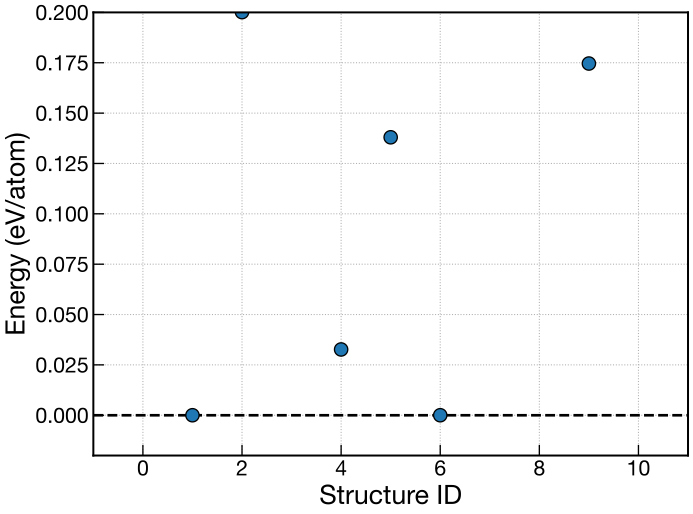
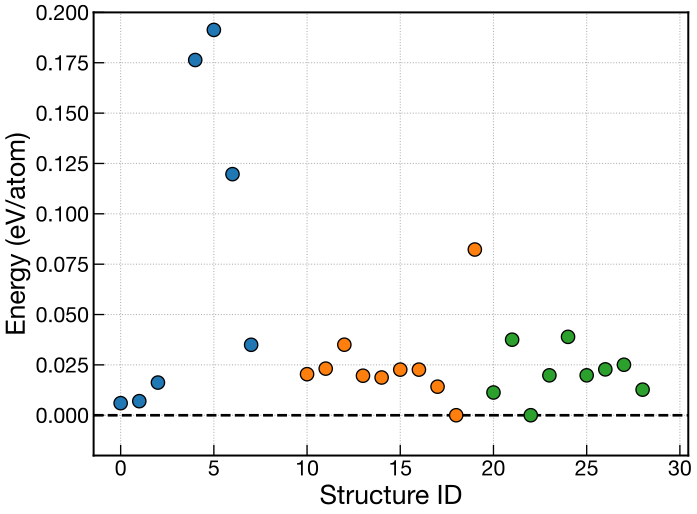
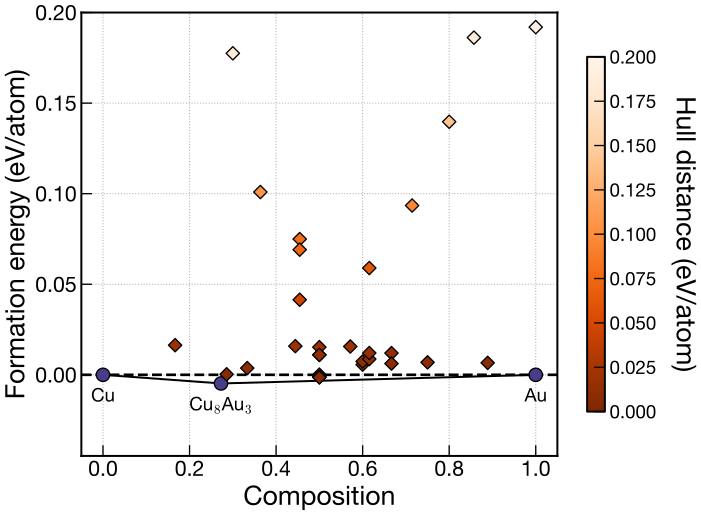
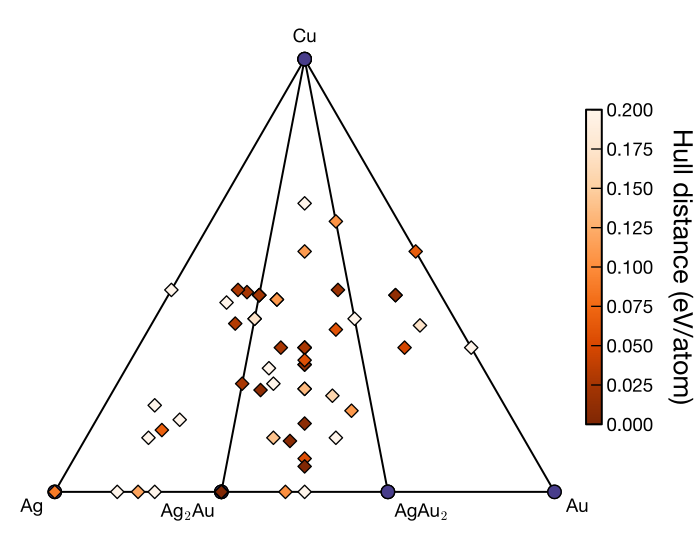
An example using the convex hull from generation 3 and displaying structures from generation 2.
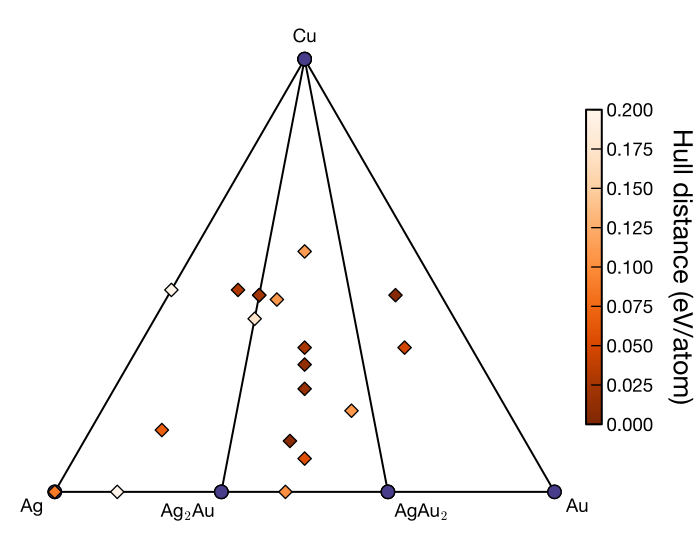
Examples of binary and ternary plots with composition constraints. The blue region represents the allowed composition range.
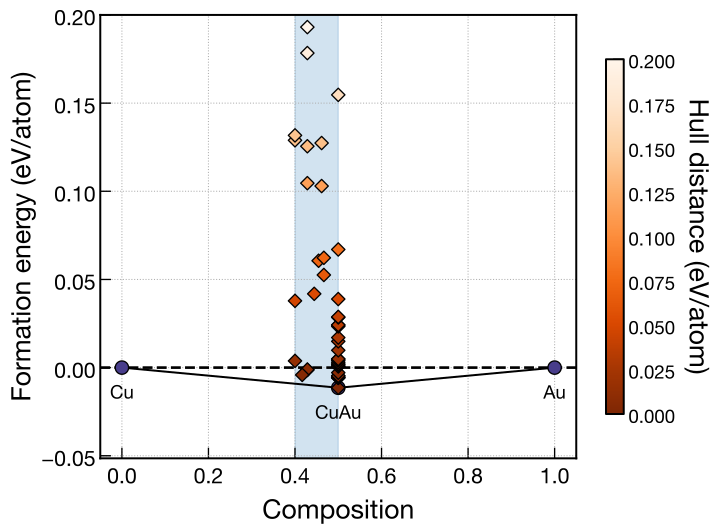
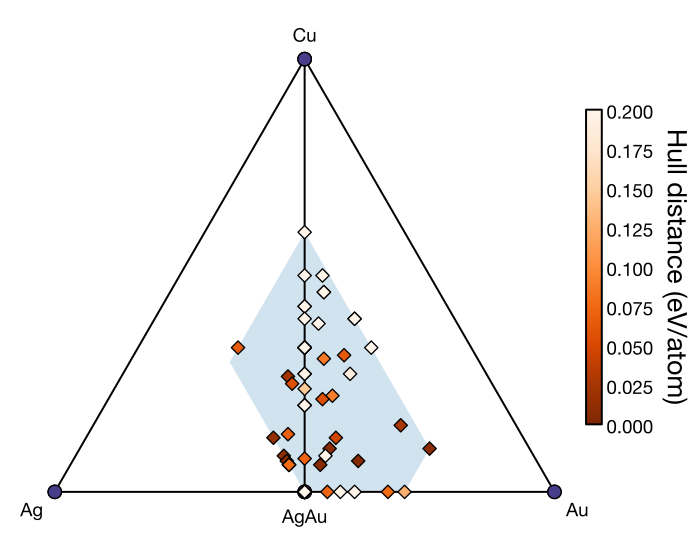
-c)From version 1.5.0, the allowed composition range can be plotted using the -c option when composition constraints are specified.
For EA-vc with min_comp or max_comp specified, the following command plots the allowed composition range defined in the current cryspy.in.
No search-result data is required, so the constraints can be checked before starting a search.
For standard binary and ternary systems, the plot is saved as ./data/convex_hull/composition_window_input.<fig_format>.
fig_format defaults to svg and can be changed to png or pdf in the [visual] section.
The species arrangement is specified by axis_order in the same section.
The input in the filename indicates that the plot is based on the input at execution time, independently of the generation number.
Examples for binary and ternary systems are shown below.
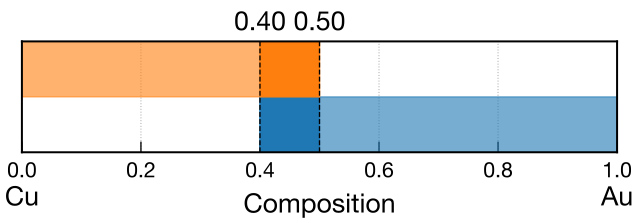
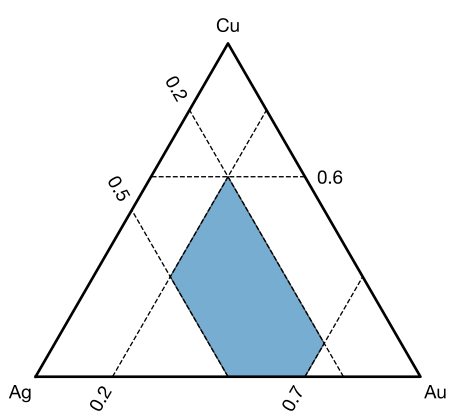
These plots represent the continuous composition region determined by min_comp and max_comp.
They do not account for integer atom-count constraints from ll_nat and ul_nat or charge neutrality from charge.
For input examples and an explanation of the plots, see Composition Constraints.
When -c is specified, the command outputs the composition-window plot and exits.
To replot the energy or convex hull of search results, run cryspy-Eplot without -c.
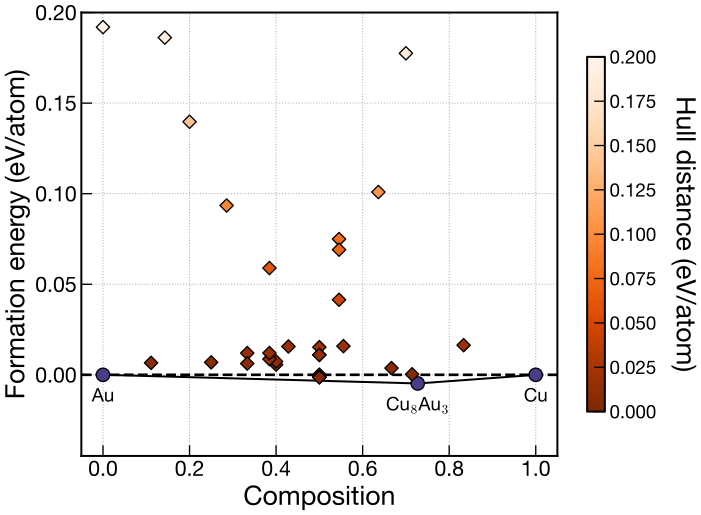
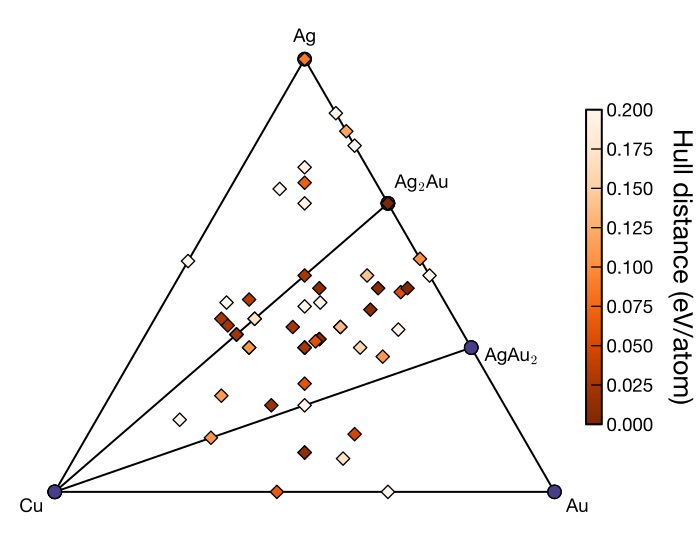
Change axis_order in the [visual] section of cryspy.in, then run cryspy-Eplot to redraw the plot with a different arrangement of species.
For details, see Tutorial > EA-vc > Analysis and Visualization and Input File > [visual] Section.
For binary systems, assign l (left) and r (right) in the order of atype.
The examples below use axis_order = lr (left) and axis_order = rl (right).
For ternary systems, assign t (top), l (left), and r (right) in the order of atype.
The examples below use axis_order = tlr (left) and axis_order = ltr (right).
terminals)Specify two or three compound compositions with terminals in the [visual] section of cryspy.in to plot a convex hull using those compositions as references.
This uses pymatgen’s CompoundPhaseDiagram.
Depending on the reference compositions, a ternary system can also be plotted as a pseudo-ternary system, or a quaternary system as a pseudo-ternary system. Here, we show an example of plotting a ternary system as a pseudo-binary system.
This setting is for post-analysis with cryspy-Eplot and does not affect convex-hull calculations or natural selection during the search.
The following example uses a ternary Li–Al–O search through generation 30 with a charge neutrality condition imposed. The [structure] section is configured as follows.
Compositions satisfying this charge neutrality condition lie on the line connecting Li2O and Al2O3 in the ternary composition diagram. Using these compound compositions as references therefore allows the convex hull to be plotted as a pseudo-binary Li2O–Al2O3 system. See Features > Charge Neutrality Condition for details on imposing charge neutrality.
The left figure shows the ternary convex hull referenced to the elements; the right figure shows the pseudo-binary convex hull referenced to Li2O and Al2O3.
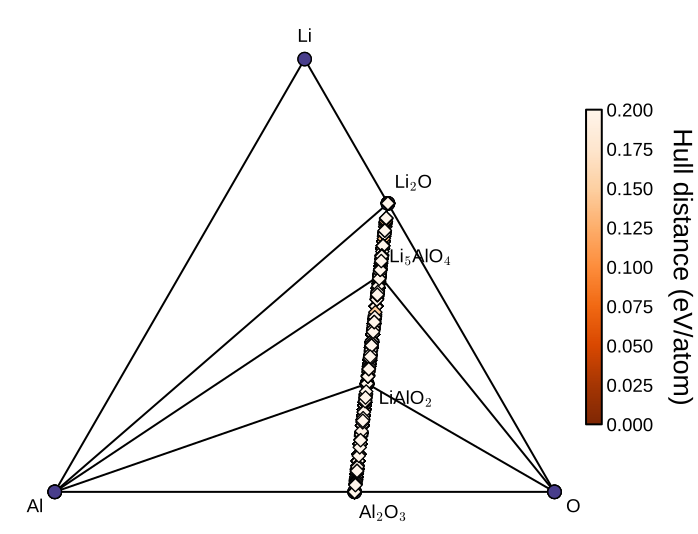
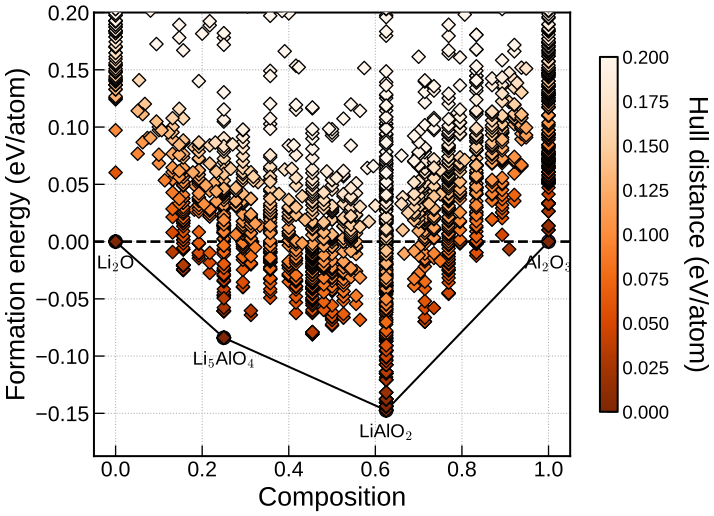
To obtain the right figure, configure the [visual] section as follows and run cryspy-Eplot.
The output filename includes _terminals_Li2O-Al2O3 to identify the reference compound compositions. In this example, the plot is saved in the default SVG format as ./data/convex_hull/conv_hull_gen_30_terminals_Li2O-Al2O3.svg.
With two compound compositions, omitting terminal_axis_order uses the default lr: Li2O is placed on the left and Al2O3 on the right, following the order in terminals.
Each specified compound composition must have an entry in the phase-diagram data used for plotting.
See Input File > [visual] Section for parameter details.
Last updated: October 16, 2026
Recalculate the EA-vc convex hull and each structure’s hull distance using results up to a specified generation.
Use this after excluding incorrect structures with cryspy-skip or changing the energy cutoffs with emin_ea and emax_ea.
Run the command in the CrySPY calculation directory, specifying a generation number.
This example uses results from generations 1 through 10 to recalculate the convex hull and hull distances at generation 10.
It updates that generation’s data in pd_data.pkl and hdist_data.pkl and writes a hull-distance table. A convex hull plot is also generated for binary and ternary systems.
See Features > Skip Calculations for the detailed procedure.
Last updated: October 16, 2026
Cancel results already recorded in rslt_data.pkl and mark the specified structures as skipped.
Use this when incorrect electronic states or similar problems have produced abnormal energies.
Run the command in the CrySPY calculation directory, specifying one or more structure IDs.
This example invalidates the optimized structures and energies for IDs 198 and 157 and sets their Opt values to skip.
For EA and EA-vc, these structures are also removed from the elite data if present.
For EA-vc, recalculate the convex hull with cryspy-calc-convex-hull as needed.
See Features > Skip Calculations for the detailed procedure and how to skip calculations while they are running.
Last updated: October 16, 2026
From v1.5.0, cryspy-print lets you inspect pickle files under data/pkl_data/.
It replaces CrySPY Utility’s print_pkl.py, displaying contents or a summary according to the file type.
For rslt_data.pkl, it also supports sorting by energy, selecting rows, filtering by composition, and regenerating result files.
The input file can be specified with a relative or absolute path. Gzip-compressed files are also supported.
The file type is determined by its filename, so keep names such as rslt_data.pkl unchanged.
| Argument or option | Description |
|---|---|
infile | Pickle file to display. Gzip-compressed files, such as rslt_data.pkl.gz, are also accepted. |
--no-sort | Display rslt_data.pkl in its stored row order without sorting. |
--head N | Display the first N rows after filtering and sorting. N must be a positive integer. |
--tail N | Display the last N rows after filtering and sorting. N must be a positive integer. |
--all | Display all rows after filtering and sorting. |
-c N [N ...], --composition N [N ...] | Filter EA-vc results in rslt_data.pkl by composition ratio, specified in atype order. |
--write | Regenerate ./data/cryspy_rslt and ./data/cryspy_rslt_energy_asc from rslt_data.pkl. |
-h, --help | Show help. |
--no-sort, --head, --tail, --all, --composition, and --write are options for rslt_data.pkl.
--head, --tail, and --all cannot be combined. --write cannot be combined with display options.
| File | Output |
|---|---|
input_data.pkl | Input settings grouped by section. Fields whose value is None are omitted. |
init_struc_data.pkl, opt_struc_data.pkl, struc_step_data.pkl, elite_struc.pkl, init_dscrpt_data.pkl, opt_dscrpt_data.pkl | Number of stored entries (Number of structures). Structure IDs are not listed. |
rslt_data.pkl | Results table, sorted by energy in ascending order by default. |
hdist_data.pkl | Latest generation and its number of structures. Prints No hull distance data if empty. |
pd_data.pkl | Latest generation and its numbers of stable entries and all entries. Prints No phase diagram data if empty. |
cn_comb_data.pkl | Charge-neutrality settings and the number of charge-neutral combinations. Reports when cn_comb is None. |
The contents of the following files are pretty-printed.
id_queueing.pkl, id_running.pkl, energy_step_data.pkl, force_step_data.pkl, stress_step_data.pkl, kpt_data.pkl, rng_state_data.pklgen.pkl, ea_info.pkl, ea_origin.pkl, elite_fitness.pklnat_data.pkln_selection.pkl, id_select_hist.pkl, bo_mean.pkl, bo_var.pkl, bo_score.pkltot_step_select.pkl, laqa_energy.pkl, laqa_bias.pkl, laqa_score.pkl, laqa_step.pkl, laqa_struc.pklAn unsupported filename causes an error.
Output for a file containing ten entries:
opt_struc_data.pkl and elite_struc.pkl also display the structure count.
To inspect individual structures, use the -p option of cryspy-extract-struc.
input_data.pkl displays settings grouped into sections such as [basic] and [structure].
elite_fitness.pkl displays a dictionary of structure IDs and fitness values.
Results are sorted in ascending order of Ef_eV_atom if that column exists, or E_eV_atom otherwise.
All rows are displayed if there are at most 100 rows. For larger tables, the command displays the count and sort order, followed by the first 100 rows.
These display the first ten rows, last five rows, or all rows of the table sorted by energy in ascending order.
Use --no-sort to keep the stored row order. It can be combined with row selection.
This selects structures with a composition ratio of 1:2 in atype order and displays the first ten rows in ascending energy order.
Atom counts such as (1, 2) and (2, 4) match the same ratio.
Specify one non-negative integer per element, with at least one positive value.
This option requires EA-vc results with a Num_atom column. A message is displayed if no structures match.
For an example with output, see Tutorial > EA-vc > Check Results > Checking Results for a Specific Composition.
The file is read without decompression beforehand. Other supported files can also be supplied in gzip-compressed form.
Run the following in the calculation directory containing cryspy.in.
This regenerates the following files, overwriting existing files.
./data/cryspy_rslt: Results in their stored row order../data/cryspy_rslt_energy_asc: Results sorted by Ef_eV_atom in ascending order, or E_eV_atom if the former column is absent.Files are written to data/ under the directory where the command is run. This directory must exist.
The operation is also recorded in log_cryspy.
Last updated: October 16, 2026
From v1.5.0, cryspy-extract-struc extracts structures from init_struc_data.pkl or opt_struc_data.pkl and saves them as CIF files.
This command integrates CrySPY Utility’s extract_struc.py into CrySPY. It can also print structure information without writing files.
The input file can be specified with a relative or absolute path. CIF files are saved in the directory where the command is run.
Specify exactly one of -i, -a, or -t; these options cannot be combined.
| Argument or option | Description |
|---|---|
infile | A structure-data pickle file, such as init_struc_data.pkl or opt_struc_data.pkl. Gzip-compressed files are also supported. |
-i INDEX [INDEX ...], --index INDEX [INDEX ...] | Structure IDs to extract. Multiple IDs can be specified. |
-a, --all_id | Extract all structures in the input file. |
-t TOP, --top TOP | Extract the specified number of structures in ascending order of E_eV_atom in rslt_data.pkl. |
-p, --print | Print structure information without writing CIF files. |
-r, --rank | Use with -t to prefix output filenames with the rank. |
-s, --symmetrized | Write CIF files with symmetry information. |
--tolerance TOLERANCE | Tolerance for symmetry detection with -s. The default is 0.01. |
-h, --help | Show help. |
Structures with IDs 0 and 1 are saved as 0.cif and 1.cif in the current directory. Missing IDs are skipped with a warning.
With -p, structure IDs and structure information are printed without creating CIF files.
This extracts the three lowest-energy structures. rslt_data.pkl must be in the same directory as the input file.
Output filenames are {ID}.cif.
Adding -r produces filenames of the form {rank}_{ID}.cif. Ranks start from 1.
All initial structures are saved as {ID}.cif.
With -s, output CIF files include symmetry information such as the space group. --tolerance is optional.
Adding symmetry information may change the cell representation and the number of atoms.
Gzip-compressed structure data can be read directly without decompression. Options such as -a, -t, -p, and -s can be used in the same way.
When using -t, place rslt_data.pkl in the same directory as the compressed input file.