Composition Constraints
Last updated: October 16, 2026
From version 1.5.0, the composition range explored by EA-vc can be restricted.
Specify min_comp and max_comp in the [structure] section of cryspy.in.
These constraints apply to both random structure generation and structure generation by evolutionary operations.
Composition constraints can be used for binary and ternary systems, as well as systems with four or more components.
Plots of the allowed composition region and search results are available for binary and ternary systems.
Settings
The composition fraction of each atomic species is its number of atoms divided by the total number of atoms in the cell, and ranges from 0 to 1. For example, atom counts of (Cu, Au) = (2, 6) give a composition of (Cu, Au) = (0.25, 0.75).
min_comp specifies the lower composition bounds, and max_comp specifies the upper bounds.
Both must have the same number of entries as atype, in the same order. The boundaries are included in the allowed range.
- If only
min_compis specified,max_compis set to1.0for every species. - If only
max_compis specified,min_compis set to0.0for every species. - If both are omitted, no composition constraints are imposed.
While ll_nat and ul_nat restrict the number of atoms of each species, min_comp and max_comp restrict their fractions.
When these settings are combined, only combinations of atom counts satisfying all conditions are explored.
For a list of input variables, see Input File > [structure] Section.
Binary Example
Example of the [structure] section in cryspy.in:
Here, the Cu fraction is restricted to at most 0.6, and the Au fraction to at most 0.5. Since the two fractions sum to 1, the Au upper bound of 0.5 gives a Cu lower bound of 0.5, while the Cu upper bound of 0.6 gives an Au lower bound of 0.4. Therefore, only structures with a Cu fraction of 0.5–0.6 and an Au fraction of 0.4–0.5 are generated. For example, atom counts of (Cu, Au) = (4, 4), (3, 2), and (6, 4) satisfy the conditions, whereas (2, 6), (6, 2), and structures containing only Cu or only Au do not.
Changing min_comp and max_comp to the following values gives the same allowed composition range:
On the first run of CrySPY, the allowed composition range is plotted automatically and saved as ./data/convex_hull/composition_window_1.svg.
The 1 in the filename is the generation number to which these composition constraints apply.
The file extension follows fig_format in the [visual] section, which defaults to svg.
The figure below corresponds to the first input example.
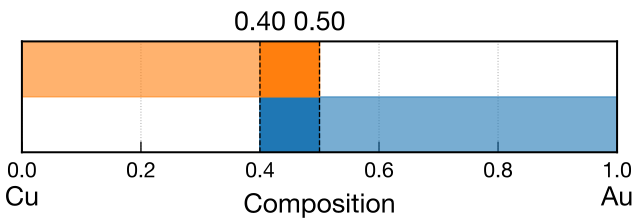
In binary composition-window plots, the species are arranged along the horizontal axis according to axis_order in the [visual] section to match the convex-hull plot.
In this figure, the horizontal axis represents the Au fraction.
The lower blue band corresponds to the Cu constraint, and the upper orange band to the Au constraint. The range satisfying both is shown with darker colors and dashed lines.
In this example, the allowed Au fraction is 0.4–0.5.
The following figure shows search results through generation 3 using these composition constraints.
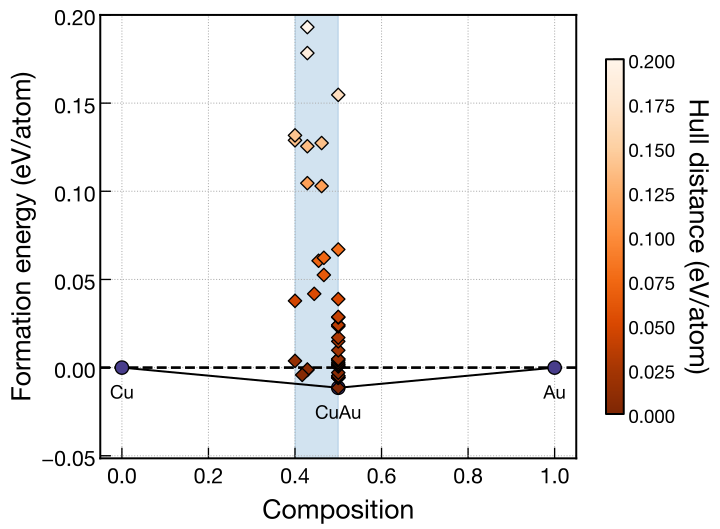
The horizontal axis represents the Au fraction, and the blue region indicates the allowed range of 0.4–0.5.
Ternary Example
Example of the [structure] section in cryspy.in:
Input 1 is active in this example.
To use input 2 or input 3, comment out the min_comp and max_comp lines for input 1 and remove the leading # from both lines of the desired input.
The composition fractions always sum to 1.
The allowed region in a ternary diagram therefore consists of compositions satisfying the lower and upper bounds of every species.
As in the binary example, the plot is saved automatically as ./data/convex_hull/composition_window_1.<fig_format> on the first run.
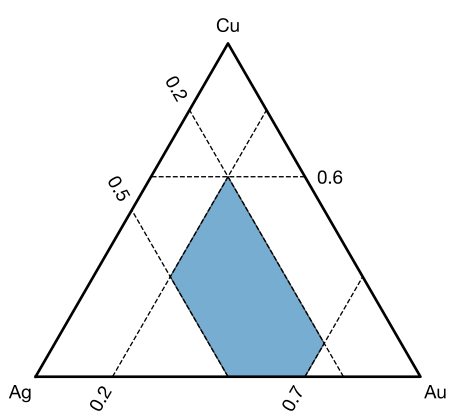
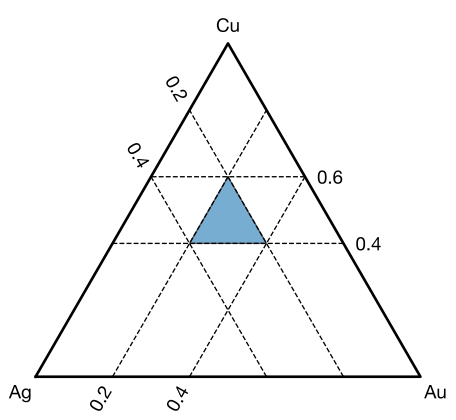
The three figures below were drawn for the respective inputs using cryspy-Eplot -c.
In each figure, Cu is at the top vertex, Ag at the lower left, and Au at the lower right. Dashed lines mark the specified composition bounds.
From left to right, the figures correspond to input 1, input 2, and input 3.
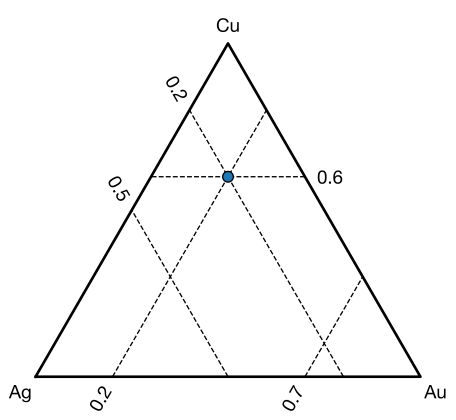
Input 1
The Cu fraction is restricted to 0.0–0.6, Ag to 0.2–0.5, and Au to 0.2–0.7. The blue region represents compositions satisfying all these conditions. For example, atom counts of (Cu, Ag, Au) = (3, 2, 5) give a composition of (0.3, 0.2, 0.5), which satisfies the constraints.
Input 2
The Cu fraction is restricted to 0.4–0.6, and the Ag and Au fractions are each restricted to 0.2–0.4. The allowed region is a triangle with vertices at (Cu, Ag, Au) = (0.6, 0.2, 0.2), (0.4, 0.4, 0.2), and (0.4, 0.2, 0.4). For example, atom counts of (Cu, Ag, Au) = (4, 3, 3) give a composition of (0.4, 0.3, 0.3), which satisfies the constraints.
Input 3
Both Cu bounds are set to 0.6, while Ag is restricted to 0.2–0.5 and Au to 0.2–0.7.
Since the Cu fraction is fixed at 0.6, the Ag and Au fractions must sum to 0.4.
Their lower bounds are both 0.2, so the only allowed composition is (Cu, Ag, Au) = (0.6, 0.2, 0.2), shown as a blue point.
The atom counts are still variable.
For example, structures with atom counts of (Cu, Ag, Au) = (3, 1, 1) and (6, 2, 2) have the same composition and both satisfy ll_nat and ul_nat.
Search Results
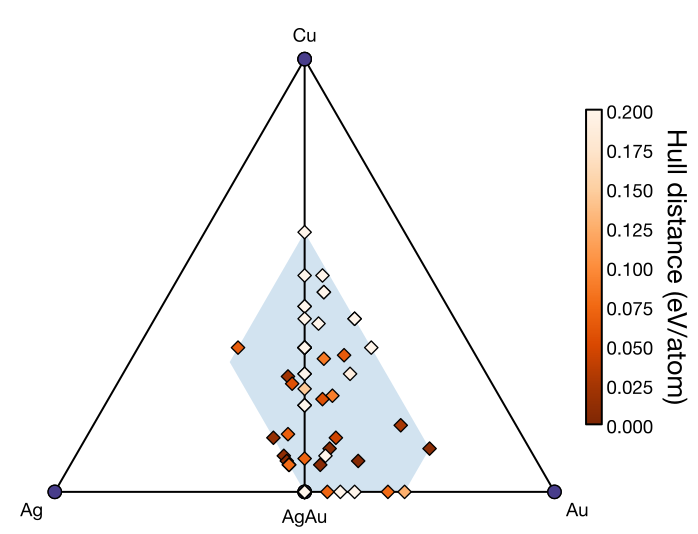
The following figure shows search results through generation 3 using the composition constraints of input 1. The blue region indicates the allowed composition range.
Combining Composition Constraints with Charge Neutrality
charge can be used together with composition constraints.
Generated structures must then satisfy the atom-count constraints, composition constraints, and charge neutrality condition.
As in the charge neutrality example, Cu, Ag, and Au are assigned hypothetical charges of +1, +2, and −1, respectively. The Cu fraction is restricted to 0.0–0.3, Ag to 0.1–0.4, and Au to 0.4–0.7. For example, atom counts of (Cu, Ag, Au) = (1, 2, 5) give a composition of (0.125, 0.25, 0.625), which satisfies the composition constraints. The total charge is also 1 × (+1) + 2 × (+2) + 5 × (−1) = 0, satisfying charge neutrality.
The left figure shows the allowed composition range, and the right figure shows search results through generation 3 with both composition constraints and charge neutrality applied.
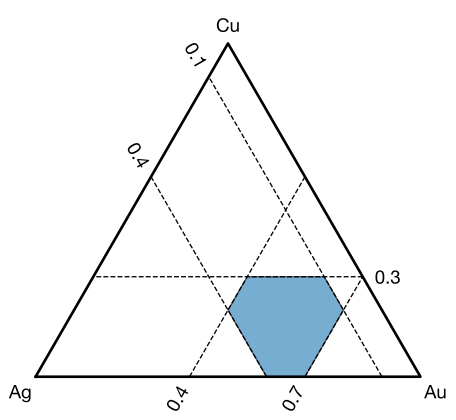
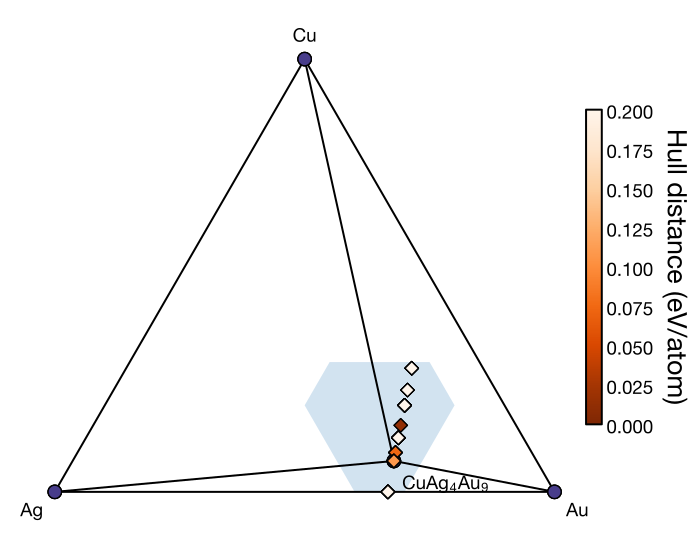
The blue region represents the composition constraints only; it does not include the charge neutrality condition. Generated structures are restricted to compositions within this region that also satisfy charge neutrality.
Checking the Allowed Composition Range
For binary and ternary systems, the first run of CrySPY with composition constraints automatically saves a plot as ./data/convex_hull/composition_window_1.<fig_format>.
The number in the filename indicates the generation to which the composition constraints apply.
If min_comp or max_comp is changed during a search, the new constraints apply to parent filtering and structure generation at the next generational change.
The plot is saved when CrySPY is run again after the input change, without waiting for the generational change. Its filename uses the current generation number plus one.
For example, changing the constraints during generation 3 and running CrySPY again produces ./data/convex_hull/composition_window_4.<fig_format>. The new constraints are applied when generating generation 4.
Changing axis_order or fig_format also saves a plot using the next generation number.
Plots are not saved every generation if these settings remain unchanged.
To check the allowed composition region without starting a search, run the following command in the directory containing cryspy.in:
The plot is saved as ./data/convex_hull/composition_window_input.<fig_format>.
fig_format and axis_order can be specified in the [visual] section.
For details, see cryspy-Eplot and Input File > [visual] Section.
This plot represents the continuous composition region determined by min_comp and max_comp.
It does not account for integer atom-count constraints from ll_nat and ul_nat or charge neutrality from charge. Compositions that can actually be generated may therefore occupy only part of the plotted region.
Notes
For each species, min_comp must be less than or equal to max_comp.
There must also be a combination of fractions summing to 1, so the sum of min_comp must not exceed 1, and the sum of max_comp must be at least 1.
Even if a continuous composition region exists, structures cannot be generated if no integer atom-count combination within ll_nat and ul_nat satisfies the constraints.
When using charge, make sure that combinations satisfying charge neutrality also exist.
If composition constraints are changed during a search, parent and elite candidates for the next generation are filtered using the updated atom-count and composition constraints. If the constraints are so restrictive that all candidates are excluded, the search cannot continue.