Subsections of Features
Logging
2023 July 10
CrySPY 1.2.0 adopts logging library of Python.
CrySPY logs are output to both the screen and files(log_cryspy and err_cryspy).
- log –> screen and
log_cryspy - error and warning –> screen and
err_cryspy
Here is the example:
If you do not want output in the console, run cryspy with the -n option as follows:
Backup
Last updated: July 15, 2026
CrySPY provides a simple backup function. The following files and directories are backed up.
cryspy.incryspy.statlog_cryspyerr_cryspydebug_cryspycryspy_interactive.ipynbcalc_in/data/
Note that work/ is not included in the backup.
- (v1.5.0 or later) The progress number and unit are appended to the backup directory name. For a manual backup,
manualis also appended. The automatic backup interval can be specified usingbackup_interval. - (v1.1.0 or later) The files and directories listed above are copied to a directory named by date and time. Previous backups are not automatically deleted.
- (v1.0.0) Only one generation is backed up, and older backups are deleted.
Backup Directory Names (v1.5.0 or Later)
In v1.5.0 or later, the progress number and unit at the time of backup are appended to the backup directory name.
Backups are stored under backup/.
The date and time are placed at the beginning of the directory name using the following formats.
- Automatic backup:
YYYYMMDD_HHMMSS_<progress_number>_<unit> - Manual backup:
YYYYMMDD_HHMMSS_manual_<progress_number>_<unit>
The progress units are as follows.
- RS:
struc- The progress number is the number of structures with registered results.
- BO and LAQA:
select- The progress number is the current selection number.
- EA and EA-vc:
gen- The progress number is the current generation number.
Examples of backup directory names are shown below.
- Automatic backup after completing generation 5 in EA:
backup/20260715_143052_5_gen/ - Automatic backup after completing selection 3 in BO:
backup/20260715_143052_3_select/ - Manual backup in generation 5 in EA:
backup/20260715_154210_manual_5_gen/ - Manual backup in selection 3 in BO:
backup/20260715_154210_manual_3_select/ - Manual backup after registering results for 100 structures in RS:
backup/20260715_154210_manual_100_struc/
If a manual backup is performed when the progress number and unit cannot be obtained, such as before initialization, the directory name is YYYYMMDD_HHMMSS_manual.
Automatic Backup
In v1.5.0 or later, the automatic backup interval can be specified using backup_interval in the [option] section of cryspy.in.
For example, to set the automatic backup interval to 5, write:
The following values can be specified for backup_interval.
0: Disable automatic backups.- Positive integer: Perform automatic backups at the specified interval.
The default value and interval unit for each algorithm are as follows.
- RS
- The default is
0. - Automatic backups using
backup_intervalare not performed. - Divide calculations using
tot_strucand perform a manual backup after completion.
- The default is
- BO and LAQA
- The default is
1. - Automatic backups are performed in units of selections.
- An automatic backup is performed immediately before proceeding to the next selection.
- The default is
- EA and EA-vc
- The default is
1. - Automatic backups are performed in units of generations.
- An automatic backup is performed immediately before generating the next-generation structures.
- The default is
When appending structures, a backup is performed before the structures are appended, independently of the periodic backups controlled by backup_interval.
Manual Backup
To perform a manual backup, run cryspy with the -b or --backup option.
This command performs only the backup without running the normal calculation process.
Clean
2024 Dec. 22 updated
CrySPY has a simple clean (just move files) function. It is useful when you want to start over from the beginning. The following files are cleaned up:
- cryspy.stat
- log_cryspy
- err_cryspy
- lock_cryspy
- data/*
- work/*
- tmp_gen_struc/*
To clean up, run cryspy with -c or --clean option as:
Files other than calc_in/* and cryspy.in are moved to trash and grouped into a directory named by date and time.
If you do not need them, you can delete them manually.
Loading Initial Structures
Last updated: October 16, 2026
Prepared structures can be used as the initial structures for a search.
Setting load_struc_flag = True in the [option] section of cryspy.in loads ./data/pkl_data/init_struc_data.pkl on the first run. The default is False.
If fewer structures are loaded than required, the remaining structures are generated randomly.
Usage
See Tutorial > Loading Initial Structures for an example that converts three CIF files and loads the resulting data.
CrySPY Utility’s pos2pkl.py can convert structure files to init_struc_data.pkl.
Checks During Loading
The following conditions are checked when loading. If a condition is not satisfied, an error is raised and initialization stops.
- The data in
init_struc_data.pklmust be a dictionary. - Structure IDs must be consecutive integers starting from
0: for example,0,1, and2for three structures. - Each structure must be a pymatgen
Structureobject. - The number of structures must not exceed the limit below.
| Algorithm | Maximum number of structures |
|---|---|
| EA, EA-vc | n_pop |
| RS, BO, LAQA | tot_struc |
See Data Format > Initial and Optimized Structure Data for format details.
Atom Types, Atom Counts, and Composition Checks
In RS, BO, LAQA, and EA, the atom types and the number of atoms of each type must match atype and nat. Structures with different atom counts cannot be used, even if their composition ratios are the same.
In EA-vc, the following conditions are checked.
| Item | Condition |
|---|---|
| Atom types | Only atom types listed in atype are present. |
| Atom counts | Each atom count is within the bounds specified by ll_nat and ul_nat, and the structure contains at least one atom in total. |
| Composition constraints | Any composition range specified by min_comp or max_comp is satisfied. |
| Charge neutrality | If charge is specified, neutrality can be achieved with a combination of the specified oxidation states. |
See Composition Constraints and Charge Neutrality Condition for details.
The loading checks do not enforce mindist, space-group constraints, or cell-volume constraints.
Filling Missing Structures
If fewer structures are loaded than tot_struc or n_pop, the remaining structures are generated randomly.
Additional structures receive consecutive IDs following the last loaded ID.
The loaded and additional structures are saved together to ./data/pkl_data/init_struc_data.pkl and ./data/init_POSCARS.
Restriction on Interatomic Distances
2024 April 23, updated
You can restrict the interatomic distance in structure generation. Here is an example of [structure] section in the input file to limit minimum interatomic distance for a A-B binary system.
This means that minimum interatomic distances of A-A, A-B, and B-B are limited to 2.0, 1.8, and 1.5 Å, respectively. Structures with interatomic distances shorter than these values are automatically eliminated.
For ternary systems, you will need mindist_1, mindist_2, and mindist_3.
Mindist matrix must be a symmetric matrix.
Since CrySPY version 1.4.0, the minimum interatomic distance check is also performed after structure relaxation.
This feature was introduced because, with machine learning potentials, structures with nearly overlapping atoms can sometimes be obtained.
You can disable this feature by adding the following line to cryspy.in (it is enabled by default):
Example: Na8Cl8
Without mindist
cryspy.in
log_cryspy
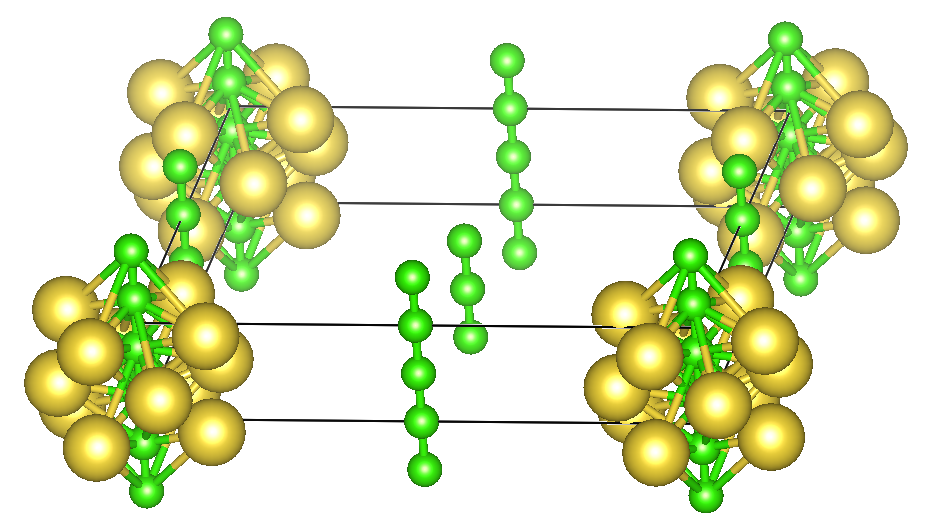
In the default settings of PyXtal, atoms can sometimes be too close to each other, as shown in the figure above, so it is recommended to set the mindist parameter. That would help simplify DFT calculations.
With mindist
cryspy.in
log_cryspy
In cases like ionic crystals, it is advisable to set up the configuration in such a way that cations and anions are kept apart from each other.
Job File Auto-Rewriting
2025 July 10, updated
In CrySPY job files, the string CrySPY_ID is automatically replaced with the structure ID.
When using job schedulers like PBS or SLURM, it is convenient to use the structure ID in the job name.
For example, in PBS, #PBS -N Si_CrySPY_ID becomes #PBS -N Si_15.
In most cases, job names cannot start with numbers, so it’s good to start with letters like Si_.
Also, since version 1.4.2, it is no longer necessary to write the following command at the end. CrySPY automatically appends it.
For example, if you prepare a job file like this in ./calc_in/job_cryspy (where job_cryspy is the file name specified by jobfile in cryspy.in):
For example, if the ID is 15, CrySPY rewrites ./work/15/job_cryspy as follows.
The CrySPY_ID in the 5th line is replaced with 15, and the sed command is appended at the end.
Structure Generation with MPI Parallelization
Oct. 21 2023, update
Random structure generation using MPI has been available since version 1.1.0 ( using CrySPY >= 1.2.3 is better). You need to install mpi4py in your Python environment for MPI parallelization. Of course, an MPI library such as Open MPI, Intel MPI, and MPICH is required for your workstation.
Info
Requirements:
- CrySPY
1.1.01.2.3 or later - mpi4py
- MPI library (Open MPI, Intel MPI, MPICH, etc.)
Warning
1.1.0 <= CrySPY <=1.2.2 has a bug.
When you use bash (zsh) to run a job with MPI (e.g., jobcmd = zsh, jobfile = job_cryspy),
the MPI job does not run. There is no problem when you use a job scheduler (qsub, sbatch).
It has already fixed in version 1.2.3.
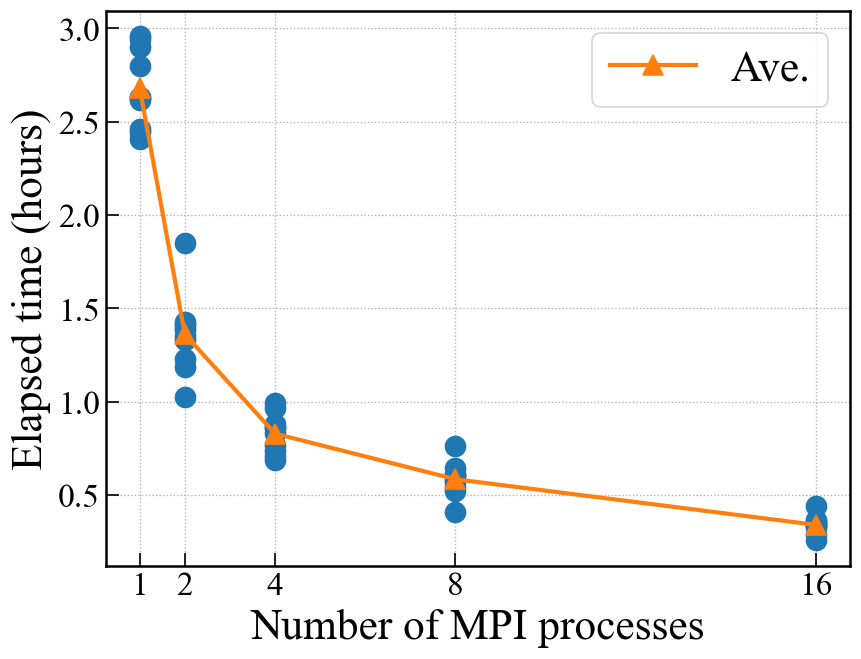
The figure below shows the relationship between elapsed time and the number of processes for 1000 structures of Si8 with the following setting:
The structure generation is taking a long time because of a slightly stricter setting like mindset_1 = 2.2.
The structure generation was performed 10 times for each number of processes.
Run
Info
Enthalpy
2023/10/18
Info
Requirements:
- CrySPY 1.2.2 or later
- VASP or QE
When performing CSP at high pressure, enthalpy results can be collected instead of total energy. Not yet compatible with softwares other than VASP and QE.
E_eV_atom in cryspy_rslt and cryspy_rslt_energy_asc turns into enthalpy (eV/atom). Here is the example of CSP results under 40 GPa pressure for Sr4O4.
CsCl-type structure (ID 5) is more stable than NaCl-type (ID 6).
VASP
CrySPY reads energy (enthalpy) from a OSZICAR file.
This automatically changes to enthalpy when PSTRESS is set in INCAR_x as follows:
You do not have to do anything in cryspy.in.
energy_step_flag is also supported for enthalpy.
Example: CrySPY utility > examples > qe_Sr4O4_RS_pv_term
QE
Add pv_term = True in the QE section of cryspy.in to use enthalpy:
Don’t forget to write press in the QE input:
Warning
In QE, energy_step_flag is not supported yet for enthalpy.
Interactive Mode
2025 March 6
Info
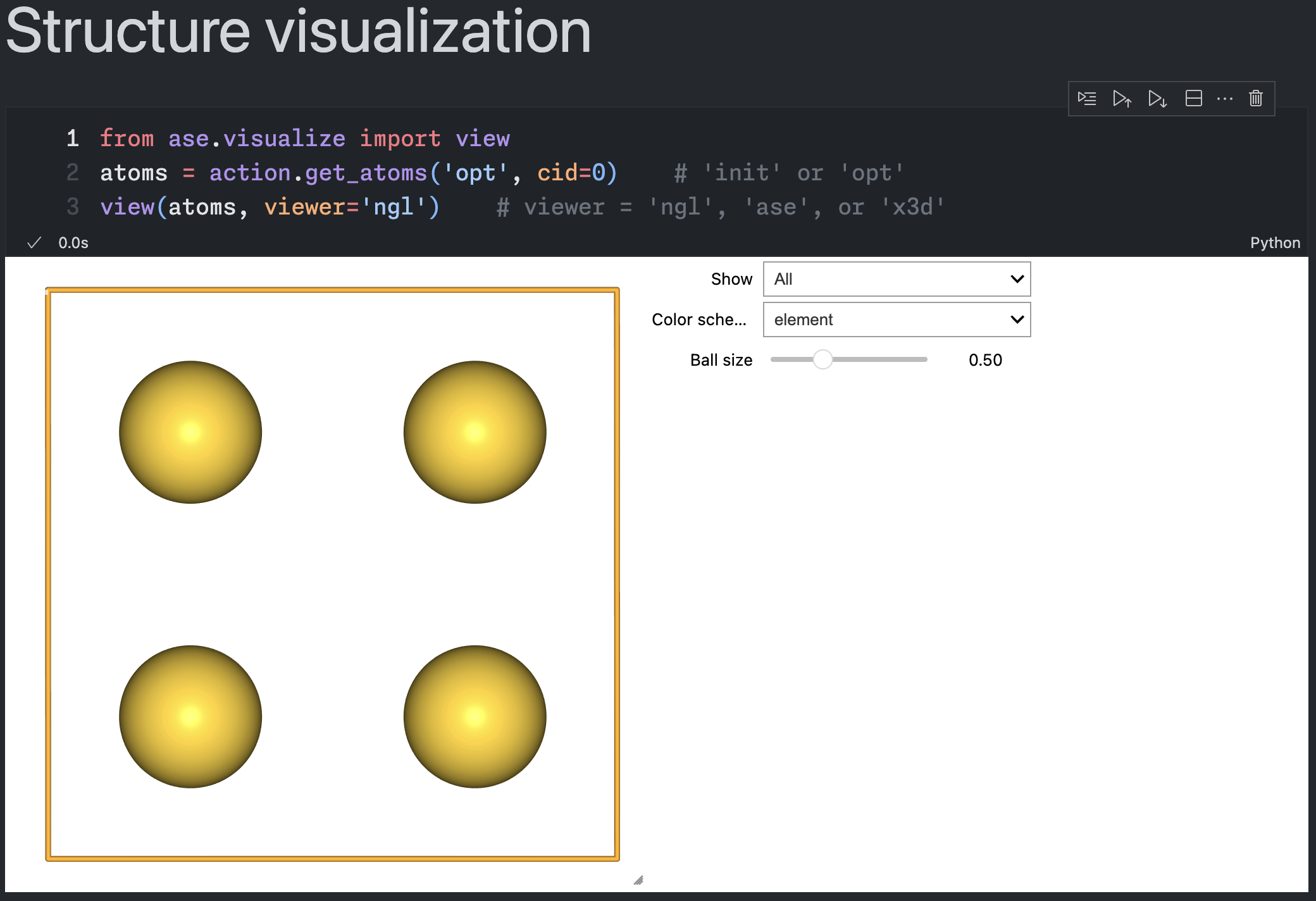
An interactive mode using Jupyter Notebook has been made available to ensure ease of use, even for those unfamiliar with PC clusters or supercomputers. Since the structure optimization calculations are designed for ASE, compatible machine learning potentials can be used.
For detailed usage, please refer to Tutorial > Interactice mode(Jupyter Notebook).
Energy Plot
Last updated: October 16, 2026
Automatic Energy Plot
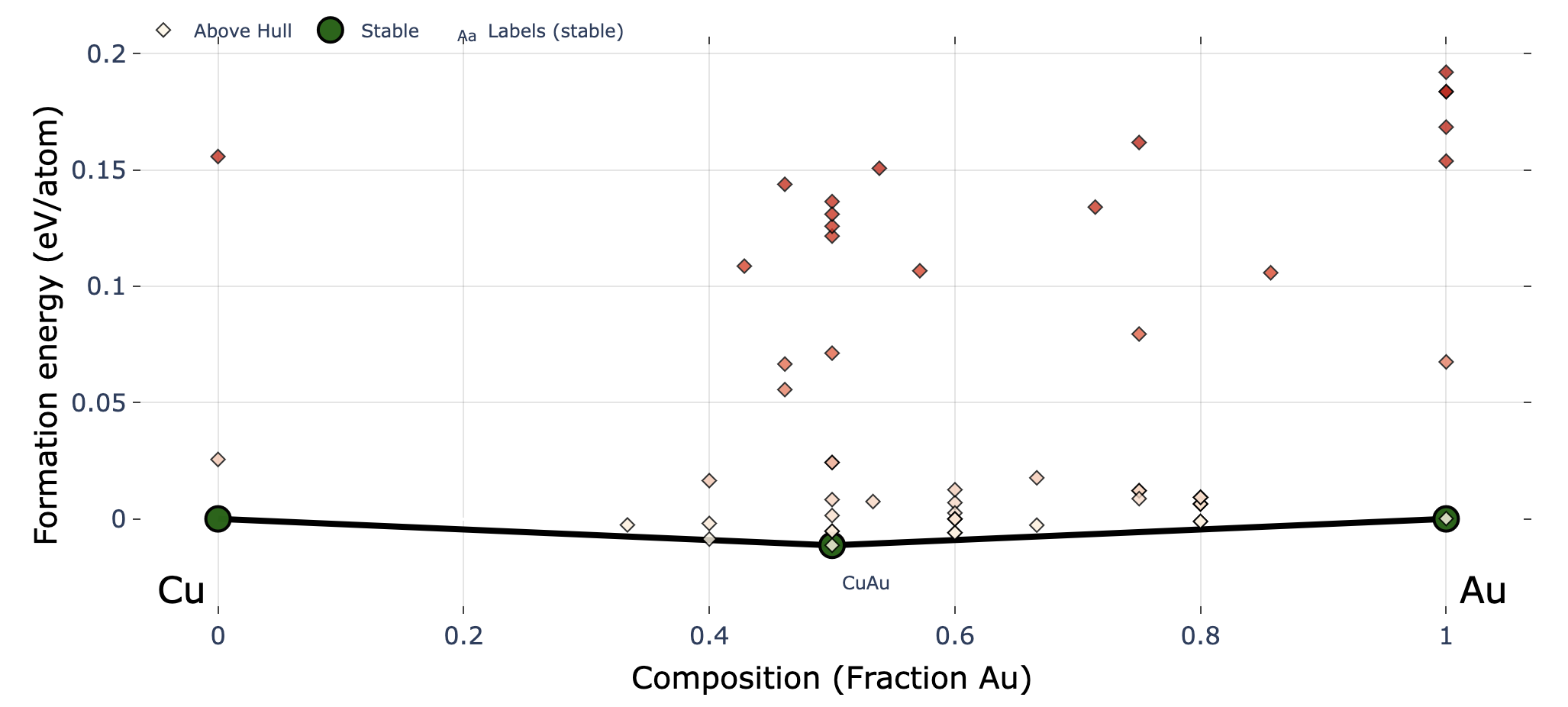
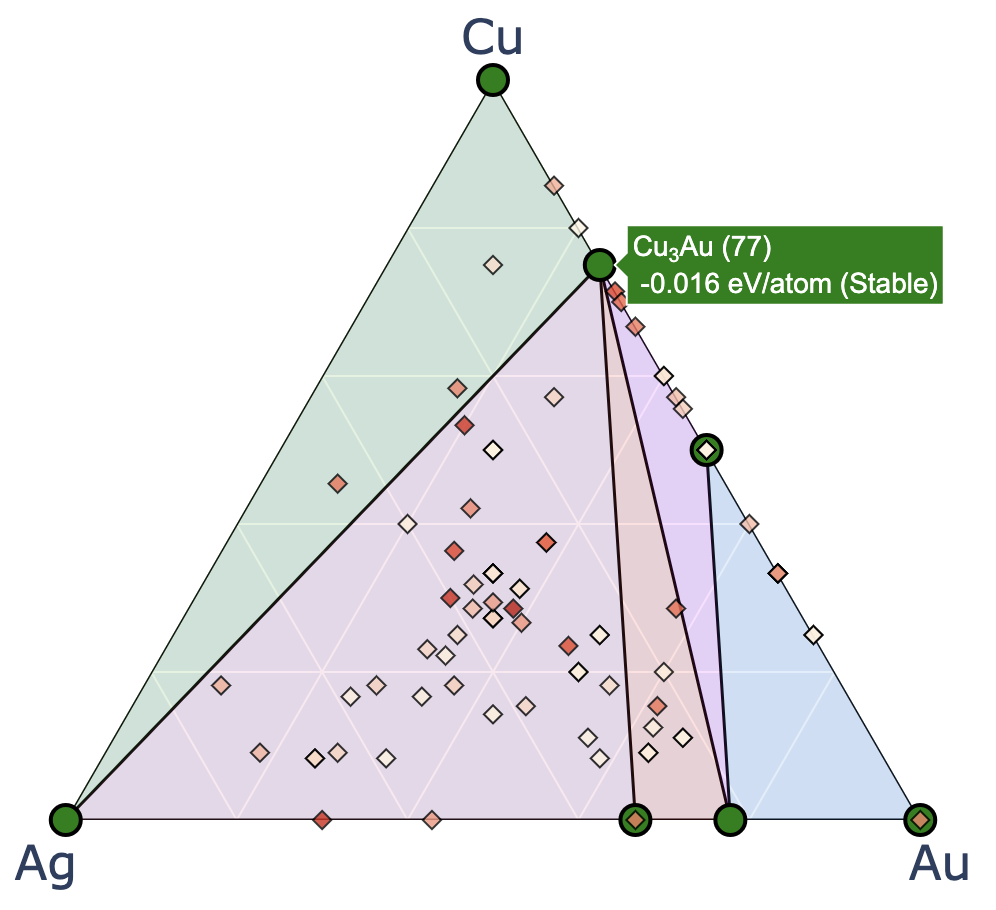
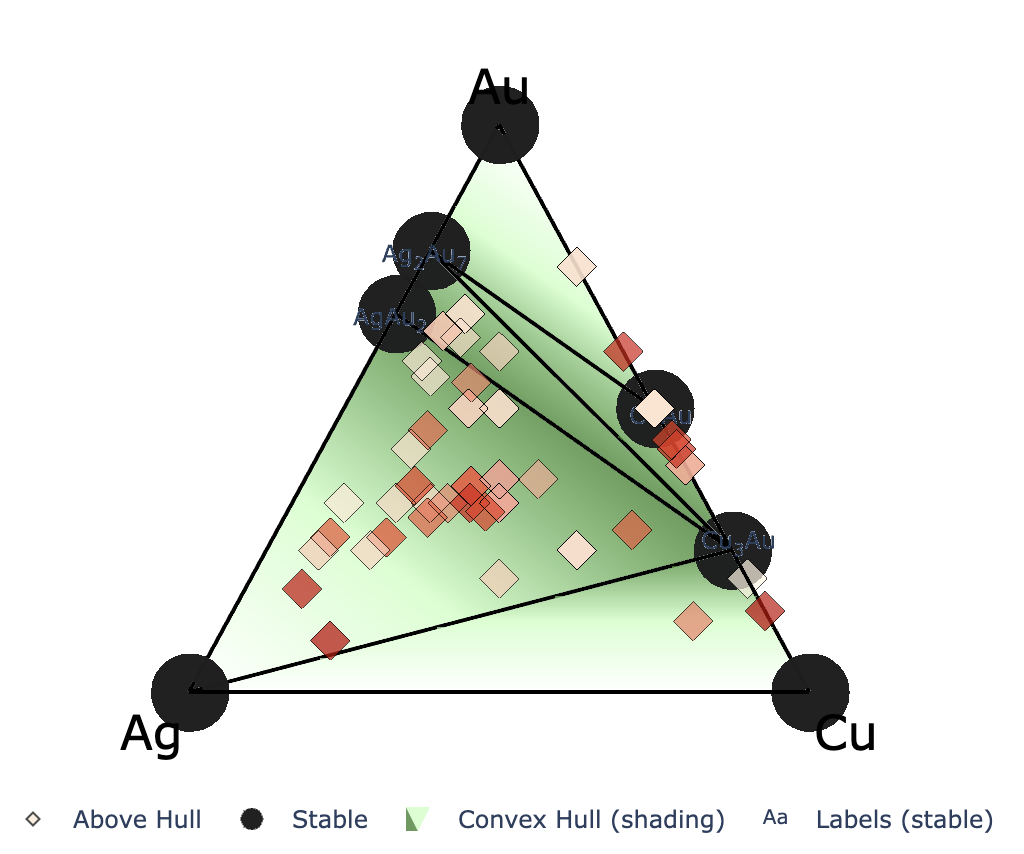
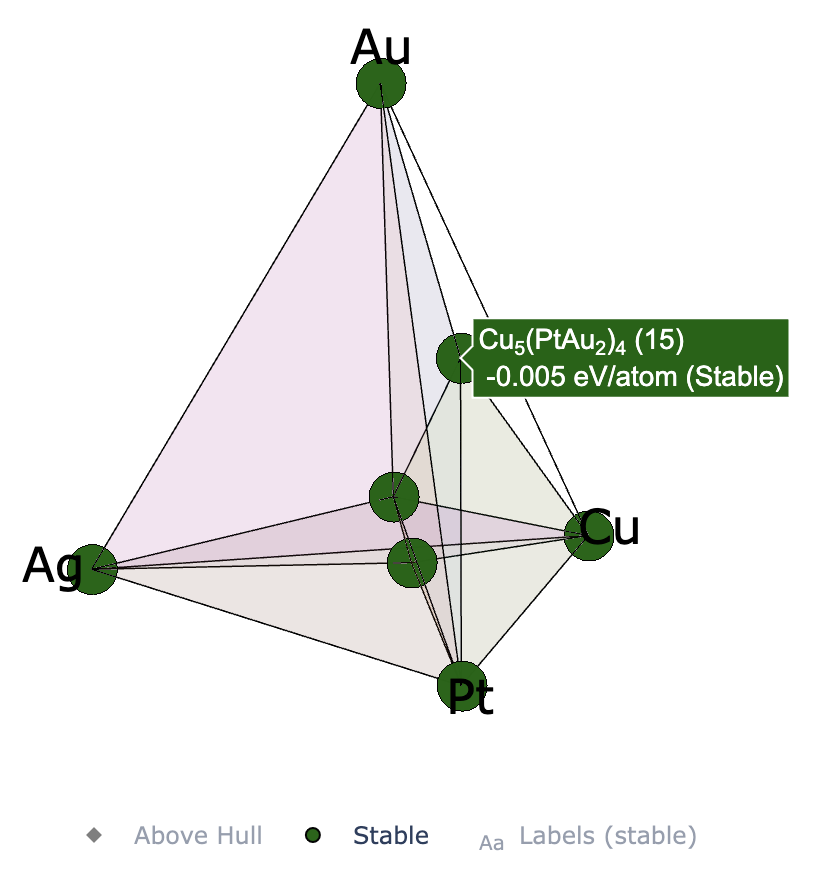
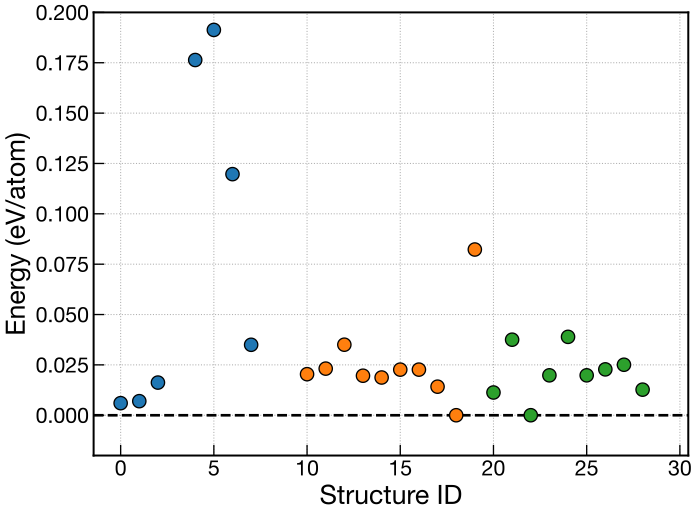
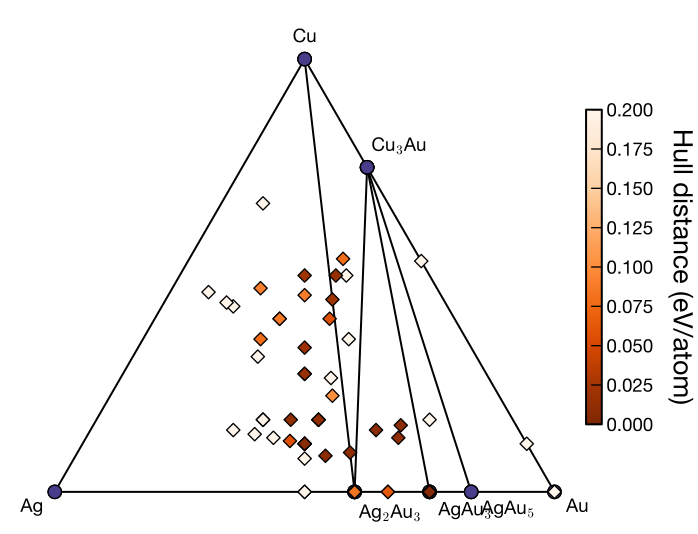
In EA and in binary or ternary EA-vc searches, plots are automatically generated at the end of each generation by default.
| Algorithm | Plot | Output file |
|---|---|---|
| EA | Energy plot | ./data/energy_plot/energy_EA_gen_{gen}.{fig_format} |
| EA-vc (binary or ternary) | Convex hull plot | ./data/convex_hull/conv_hull_gen_{gen}.{fig_format} |
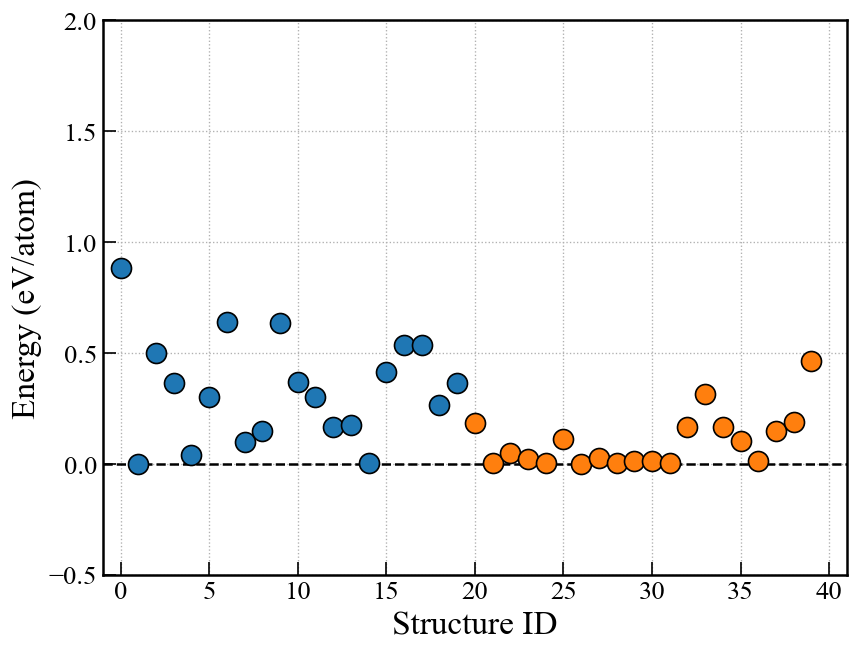
The left figure shows an EA energy plot, and the right figure shows an EA-vc convex hull plot. Both examples are from the end of generation 3.
Here, gen is the generation number and fig_format is the image format (svg by default).
Plot appearance, including the marker size and image format, can be configured in the [visual] section of cryspy.in.
See Input File > [visual] Section for details.
For EA and EA-vc, the output interval can be changed with energy_output_interval in the [option] section.
The default value is 1 (every generation); 0 disables automatic output of the energy plot in EA and the convex-hull plot and hull-distance file in EA-vc.
The convex hull and hull distances in EA-vc are still calculated every generation.
See Input File > [option] Section.
For example plots and input settings, see Tutorial > EA > Analysis and Visualization and Tutorial > EA-vc > Analysis and Visualization.
cryspy-Eplot Command
The cryspy-Eplot command visualizes search results and adjusts plots. Its main capabilities are:
- Plot energies for RS/EA and convex hulls for EA-vc.
- Replot with changes to marker size, axis limits and arrangement, image format, and other display settings.
- Specify the generation range to plot and the reference generation in EA/EA-vc.
- Plot the allowed region defined by composition constraints.
- Specify reference compound compositions to plot convex hulls as pseudo-binary or pseudo-ternary systems.
For usage and examples, see Commands > cryspy-Eplot.
Charge Neutrality Condition
Last updated: October 16, 2026
Single-Valence Species
From version 1.4.1, it is possible to impose a charge neutrality condition during structure generation in EA-vc. This can be applied to both random structure generation and structure generation by evolutionary operations.
In cryspy.in, the charge corresponding to each atype is specified as charge.
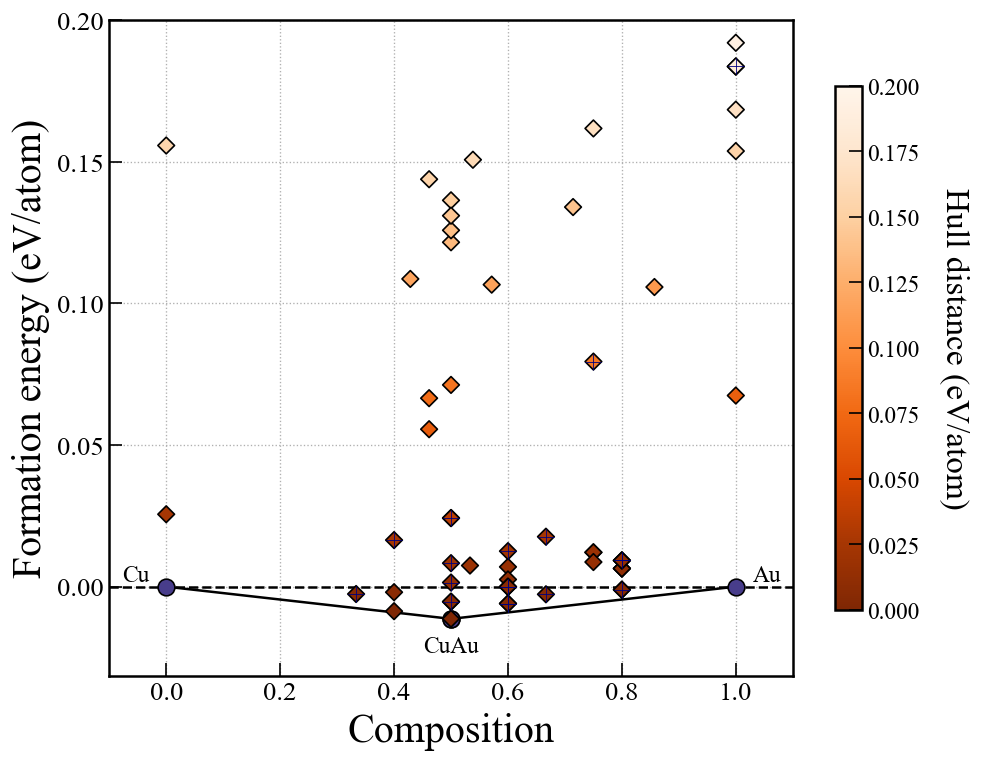
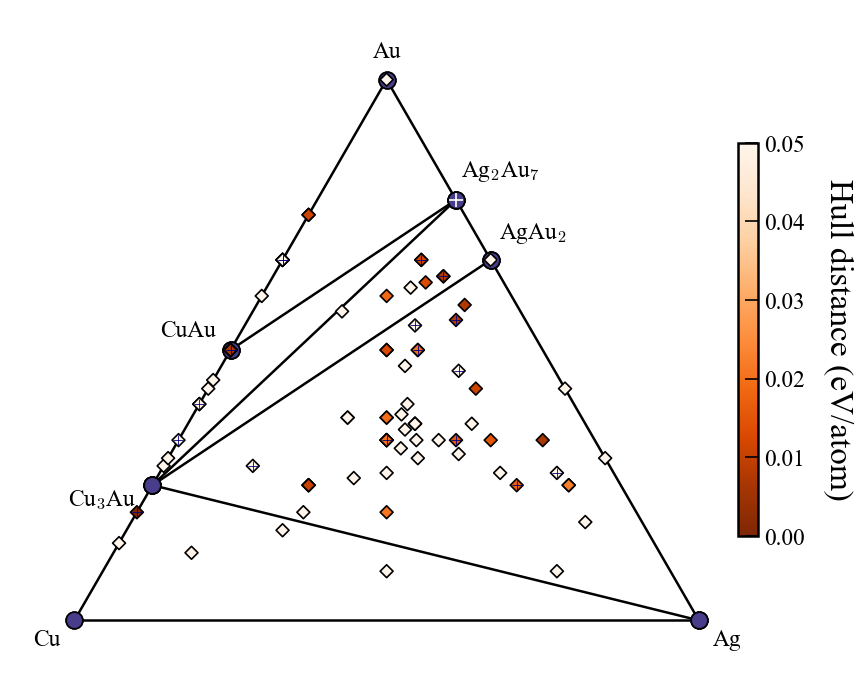
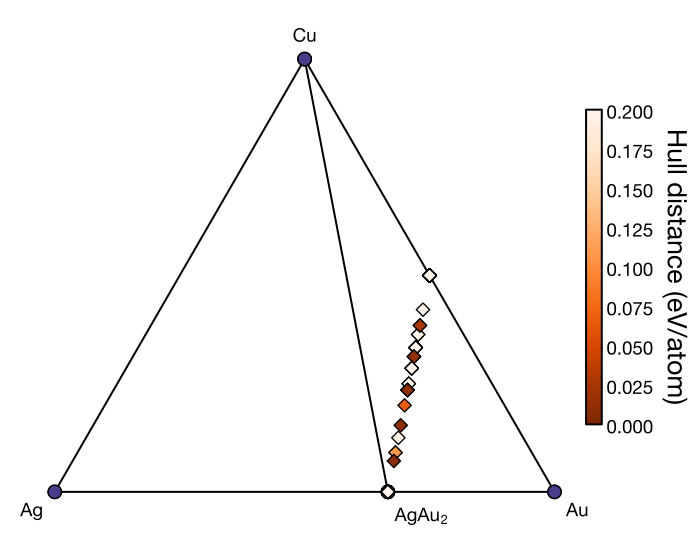
The example below assumes a Li–Ca–Cl-like combination of charges, assigning hypothetical charges of +1, +2, and −1 to Cu, Ag, and Au, respectively. Cu–Ag–Au is used as a substitute so that the charge neutrality condition can be tested easily with ASE’s lightweight Pure Python EMT calculator, as in the ASE tutorial.
Example of cryspy.in:
For example, in this case, only structures that satisfy the charge neutrality condition, such as (Cu, Ag, Au) = (4, 0, 4) or (Cu, Ag, Au) = (4, 2, 8), will be generated.
Note that if add_max or elim_max is too small as shown below, there may be no combinations of atom numbers that satisfy the charge neutrality condition when adding or removing atoms, making structure generation impossible.
For example, in the above case, if add_max = 1, there are no combinations of atom numbers that satisfy the charge neutrality condition. If add_max = 2, (Cu, Ag, Au) = (1, 0, 1), that is, adding one Cu and one Au atom, satisfies the charge neutrality condition because (+1) + (-1) = 0. If add_max = 3, there are combinations such as (Cu, Ag, Au) = (1, 0, 1) and (0, 1, 2).
The default values of add_max, elim_max, and subs_max are 5, 5, and 3, respectively.
Multi-Valence Species
From version 1.5.0, CrySPY supports elements with multiple possible oxidation states.
Multiple oxidation states can be specified in charge by enclosing them in parentheses or square brackets.
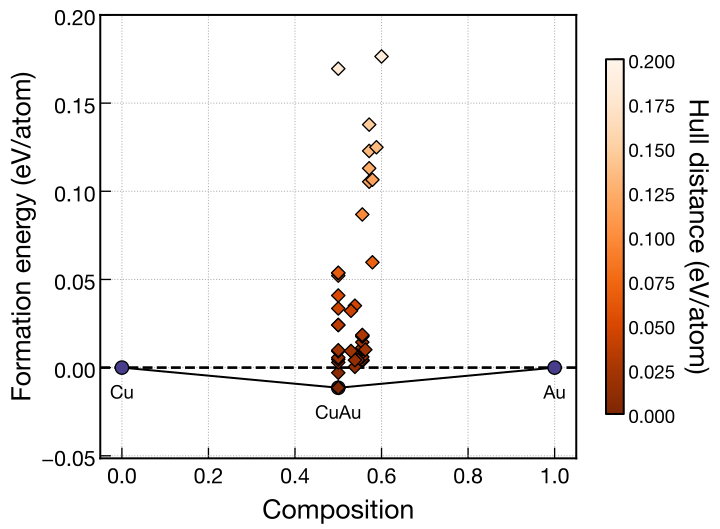
As in the single-valence example, Cu–Au is used as a substitute for a Fe–O-like system so that the charge neutrality condition can be tested easily with ASE’s lightweight Pure Python EMT calculator. Cu is assigned hypothetical charges of +2 or +3, and Au is assigned a hypothetical charge of −2.
Example cryspy.in:
For example, when the numbers of atoms are (Cu, Au) = (1, 1), charge neutrality is satisfied by assigning Cu a charge of +2. When (Cu, Au) = (2, 3), charge neutrality is satisfied by assigning both Cu atoms a charge of +3.
Even when multiple oxidation states are specified, the element is treated as a single atomic species in atype.
Therefore, ll_nat and ul_nat specify the lower and upper limits for the total number of atoms of that element, rather than the number of atoms for each oxidation state.
In addition, the generated structures do not distinguish between species such as Cu²⁺ and Cu³⁺. When checking charge neutrality, CrySPY simply determines whether the composition can be neutralized using any combination of the specified oxidation states.
Enumeration and Sampling of Atom-Count Combinations
From v1.5.0, cn_mode in the [structure] section controls how charge-neutral atom-count combinations are determined for random structure generation. This option is used only when charge is specified.
cn_mode | Behavior |
|---|---|
auto | Default. Uses enumerate if the number of combinations to examine exhaustively is at most max_cn_grid_points; otherwise, uses sample. |
enumerate | Enumerates charge-neutral atom-count combinations in advance and randomly selects from them. Raises an error if the number of combinations examined exhaustively exceeds the limit. |
sample | Generates charge-neutral atom-count combinations as needed without enumerating all combinations in advance. |
During enumeration, the charge-neutrality equation is used to eliminate one atom-count variable. All possible integer combinations of the remaining variables are examined exhaustively. For each combination, the eliminated variable is calculated and checked to ensure that its value is an integer within the atom-count bounds. max_cn_grid_points limits the number of combinations in this exhaustive search. The default is 200000000.
For example, with charge = 1 2 -1 and atom counts from 0 to 10 for each of Cu, Ag, and Au, the Ag atom-count variable is eliminated. Cu and Au each have 11 possible atom counts. For each combination, the Ag atom count is calculated as (Au atom count − Cu atom count) / 2, giving 11 × 11 = 121 combinations to examine exhaustively. For multi-valence species, the count is calculated similarly after internally expanding each oxidation state into a separate species.
For many atom types or wide atom-count ranges, sampling can reduce the computational cost and memory use associated with enumeration.
In enumerate mode, the enumerated atom-count combinations are selected with equal probability. In sample mode, the selection probabilities are not necessarily uniform.
Combining Charge Neutrality with Composition Constraints
From version 1.5.0, min_comp and max_comp can restrict the composition range in addition to imposing charge neutrality.
The example below adds composition constraints to the single-valence Cu–Ag–Au example, using the same hypothetical charges of +1, +2, and −1, respectively.
With these charges, neutrality requires the number of Cu atoms plus twice the number of Ag atoms to equal the number of Au atoms. The composition constraints additionally require the fractions of Cu, Ag, and Au to lie within 0.0–0.3, 0.1–0.4, and 0.4–0.7, respectively, including the boundaries.
For example, a structure with atom counts (Cu, Ag, Au) = (4, 0, 4) is charge neutral, but it is excluded by these composition constraints because its Ag fraction is zero. In contrast, (Cu, Ag, Au) = (1, 2, 5) has a total charge of 1 × (+1) + 2 × (+2) + 5 × (−1) = 0, and its composition (0.125, 0.25, 0.625) is also within the allowed range.
The left figure shows the allowed composition region, and the right figure shows search results through generation 3 with both conditions applied.
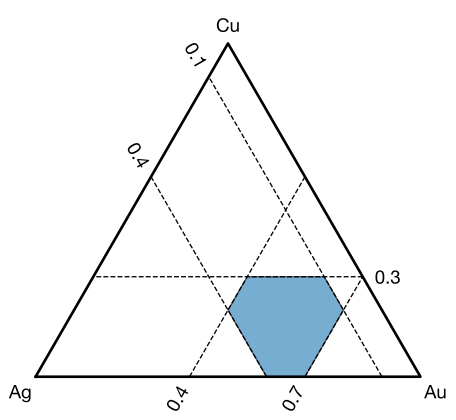
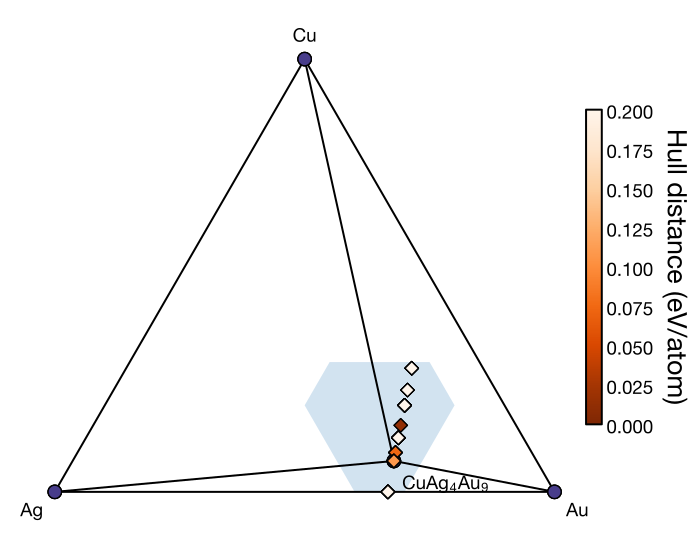
The blue region represents only the composition constraints. In this example, charge-neutral compositions lie on a line in the ternary diagram. The search is restricted to compositions where this line overlaps the blue region and the atom-count constraints are also satisfied. For details on composition constraints and their plots, see Composition Constraints.
Composition Constraints
Last updated: October 16, 2026
From version 1.5.0, the composition range explored by EA-vc can be restricted.
Specify min_comp and max_comp in the [structure] section of cryspy.in.
These constraints apply to both random structure generation and structure generation by evolutionary operations.
Composition constraints can be used for binary and ternary systems, as well as systems with four or more components.
Plots of the allowed composition region and search results are available for binary and ternary systems.
Settings
The composition fraction of each atomic species is its number of atoms divided by the total number of atoms in the cell, and ranges from 0 to 1. For example, atom counts of (Cu, Au) = (2, 6) give a composition of (Cu, Au) = (0.25, 0.75).
min_comp specifies the lower composition bounds, and max_comp specifies the upper bounds.
Both must have the same number of entries as atype, in the same order. The boundaries are included in the allowed range.
- If only
min_compis specified,max_compis set to1.0for every species. - If only
max_compis specified,min_compis set to0.0for every species. - If both are omitted, no composition constraints are imposed.
While ll_nat and ul_nat restrict the number of atoms of each species, min_comp and max_comp restrict their fractions.
When these settings are combined, only combinations of atom counts satisfying all conditions are explored.
For a list of input variables, see Input File > [structure] Section.
Binary Example
Example of the [structure] section in cryspy.in:
Here, the Cu fraction is restricted to at most 0.6, and the Au fraction to at most 0.5. Since the two fractions sum to 1, the Au upper bound of 0.5 gives a Cu lower bound of 0.5, while the Cu upper bound of 0.6 gives an Au lower bound of 0.4. Therefore, only structures with a Cu fraction of 0.5–0.6 and an Au fraction of 0.4–0.5 are generated. For example, atom counts of (Cu, Au) = (4, 4), (3, 2), and (6, 4) satisfy the conditions, whereas (2, 6), (6, 2), and structures containing only Cu or only Au do not.
Changing min_comp and max_comp to the following values gives the same allowed composition range:
On the first run of CrySPY, the allowed composition range is plotted automatically and saved as ./data/convex_hull/composition_window_1.svg.
The 1 in the filename is the generation number to which these composition constraints apply.
The file extension follows fig_format in the [visual] section, which defaults to svg.
The figure below corresponds to the first input example.
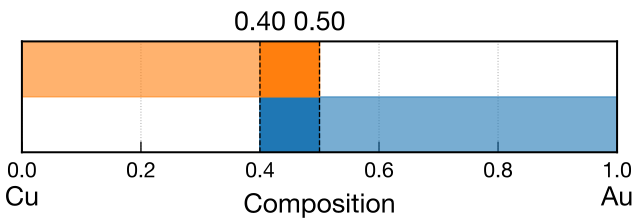
In binary composition-window plots, the species are arranged along the horizontal axis according to axis_order in the [visual] section to match the convex-hull plot.
In this figure, the horizontal axis represents the Au fraction.
The lower blue band corresponds to the Cu constraint, and the upper orange band to the Au constraint. The range satisfying both is shown with darker colors and dashed lines.
In this example, the allowed Au fraction is 0.4–0.5.
The following figure shows search results through generation 3 using these composition constraints.
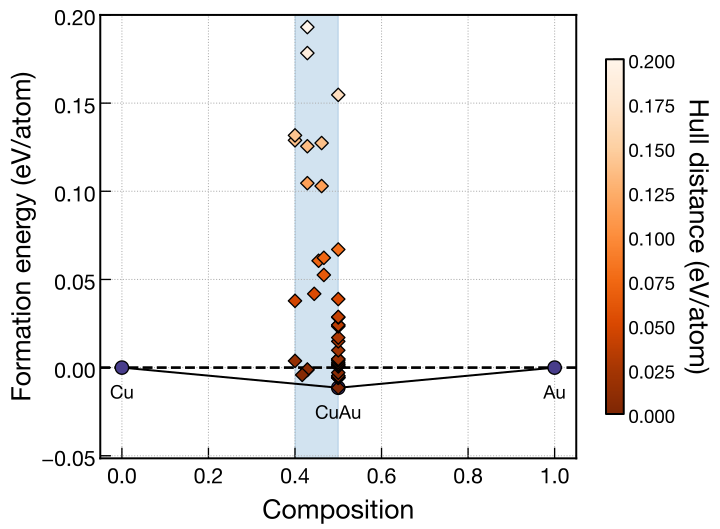
The horizontal axis represents the Au fraction, and the blue region indicates the allowed range of 0.4–0.5.
Ternary Example
Example of the [structure] section in cryspy.in:
Input 1 is active in this example.
To use input 2 or input 3, comment out the min_comp and max_comp lines for input 1 and remove the leading # from both lines of the desired input.
The composition fractions always sum to 1.
The allowed region in a ternary diagram therefore consists of compositions satisfying the lower and upper bounds of every species.
As in the binary example, the plot is saved automatically as ./data/convex_hull/composition_window_1.<fig_format> on the first run.
The three figures below were drawn for the respective inputs using cryspy-Eplot -c.
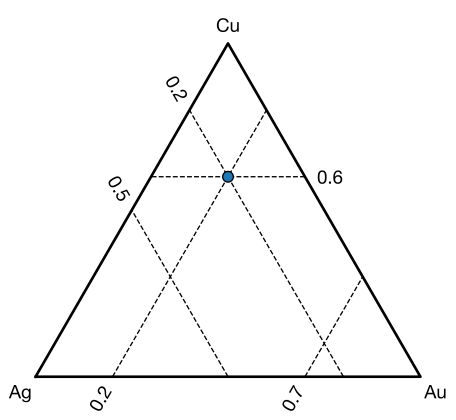
In each figure, Cu is at the top vertex, Ag at the lower left, and Au at the lower right. Dashed lines mark the specified composition bounds.
From left to right, the figures correspond to input 1, input 2, and input 3.
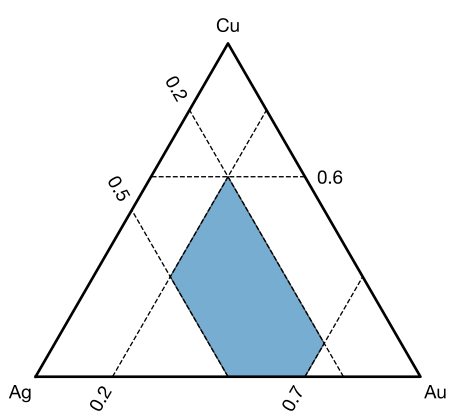
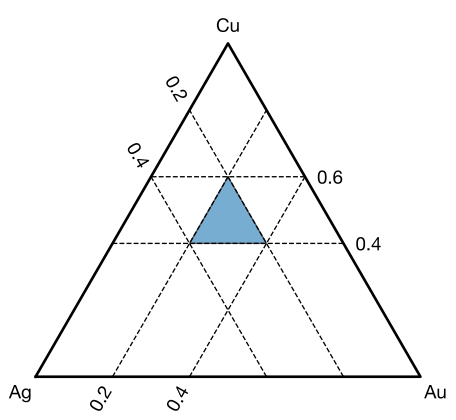
Input 1
The Cu fraction is restricted to 0.0–0.6, Ag to 0.2–0.5, and Au to 0.2–0.7. The blue region represents compositions satisfying all these conditions. For example, atom counts of (Cu, Ag, Au) = (3, 2, 5) give a composition of (0.3, 0.2, 0.5), which satisfies the constraints.
Input 2
The Cu fraction is restricted to 0.4–0.6, and the Ag and Au fractions are each restricted to 0.2–0.4. The allowed region is a triangle with vertices at (Cu, Ag, Au) = (0.6, 0.2, 0.2), (0.4, 0.4, 0.2), and (0.4, 0.2, 0.4). For example, atom counts of (Cu, Ag, Au) = (4, 3, 3) give a composition of (0.4, 0.3, 0.3), which satisfies the constraints.
Input 3
Both Cu bounds are set to 0.6, while Ag is restricted to 0.2–0.5 and Au to 0.2–0.7.
Since the Cu fraction is fixed at 0.6, the Ag and Au fractions must sum to 0.4.
Their lower bounds are both 0.2, so the only allowed composition is (Cu, Ag, Au) = (0.6, 0.2, 0.2), shown as a blue point.
The atom counts are still variable.
For example, structures with atom counts of (Cu, Ag, Au) = (3, 1, 1) and (6, 2, 2) have the same composition and both satisfy ll_nat and ul_nat.
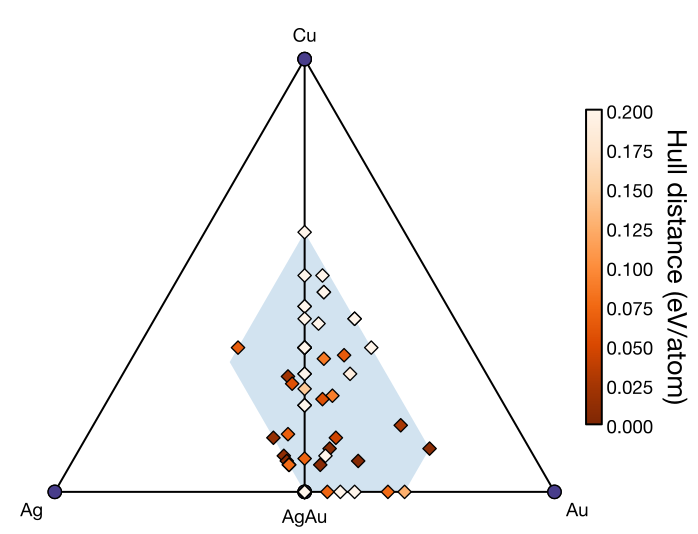
Search Results
The following figure shows search results through generation 3 using the composition constraints of input 1. The blue region indicates the allowed composition range.
Combining Composition Constraints with Charge Neutrality
charge can be used together with composition constraints.
Generated structures must then satisfy the atom-count constraints, composition constraints, and charge neutrality condition.
As in the charge neutrality example, Cu, Ag, and Au are assigned hypothetical charges of +1, +2, and −1, respectively. The Cu fraction is restricted to 0.0–0.3, Ag to 0.1–0.4, and Au to 0.4–0.7. For example, atom counts of (Cu, Ag, Au) = (1, 2, 5) give a composition of (0.125, 0.25, 0.625), which satisfies the composition constraints. The total charge is also 1 × (+1) + 2 × (+2) + 5 × (−1) = 0, satisfying charge neutrality.
The left figure shows the allowed composition range, and the right figure shows search results through generation 3 with both composition constraints and charge neutrality applied.
The blue region represents the composition constraints only; it does not include the charge neutrality condition. Generated structures are restricted to compositions within this region that also satisfy charge neutrality.
Checking the Allowed Composition Range
For binary and ternary systems, the first run of CrySPY with composition constraints automatically saves a plot as ./data/convex_hull/composition_window_1.<fig_format>.
The number in the filename indicates the generation to which the composition constraints apply.
If min_comp or max_comp is changed during a search, the new constraints apply to parent filtering and structure generation at the next generational change.
The plot is saved when CrySPY is run again after the input change, without waiting for the generational change. Its filename uses the current generation number plus one.
For example, changing the constraints during generation 3 and running CrySPY again produces ./data/convex_hull/composition_window_4.<fig_format>. The new constraints are applied when generating generation 4.
Changing axis_order or fig_format also saves a plot using the next generation number.
Plots are not saved every generation if these settings remain unchanged.
To check the allowed composition region without starting a search, run the following command in the directory containing cryspy.in:
The plot is saved as ./data/convex_hull/composition_window_input.<fig_format>.
fig_format and axis_order can be specified in the [visual] section.
For details, see cryspy-Eplot and Input File > [visual] Section.
This plot represents the continuous composition region determined by min_comp and max_comp.
It does not account for integer atom-count constraints from ll_nat and ul_nat or charge neutrality from charge. Compositions that can actually be generated may therefore occupy only part of the plotted region.
Notes
For each species, min_comp must be less than or equal to max_comp.
There must also be a combination of fractions summing to 1, so the sum of min_comp must not exceed 1, and the sum of max_comp must be at least 1.
Even if a continuous composition region exists, structures cannot be generated if no integer atom-count combination within ll_nat and ul_nat satisfies the constraints.
When using charge, make sure that combinations satisfying charge neutrality also exist.
If composition constraints are changed during a search, parent and elite candidates for the next generation are filtered using the updated atom-count and composition constraints. If the constraints are so restrictive that all candidates are excluded, the search cannot continue.
Skip Calculations
2025 July 15
Skip During Calculation
When electronic states in DFT calculations fail to converge or when you want to stop calculations for obviously unstable structures, you can skip them using the following procedure:
- Stop the job using
qdelor similar command - Change the 3rd line of
./work/xxx/stat_jobtoskip - Run CrySPY as usual
This will discard the structure and proceed to the next calculation.
Skip After Recording in cryspy_rslt (rslt_data.pkl)
CrySPY version 1.4.2 or later
When calculations finish with incorrect electronic states, the energy may be output excessively low and recorded in rslt_data. For example, in the following result, the energy of ID 198 is too low:
cryspy_rslt_energy_asc
To cancel this data and skip it, use the command automatically installed from version 1.4.2:
If you want to skip multiple structures, input multiple IDs:
This will update the data.
For EA or EA-vc
In the case of EA or EA-vc, the structure to be skipped may be registered as an elite structure. Using the cryspy-skip command removes the structures to be skipped from the data stored in elite_struc.pkl and elite_fitness.pkl.
Recalculating Convex Hull for EA-vc
In the case of EA-vc, the energy of the structure to be skipped may affect the convex hull calculation. Therefore, after skipping, recalculate the convex hull using the following command:
The 10 in the above input represents the generation, and it recalculates and plots the convex hull at generation 10.