Check Results

Last updated: October 16, 2026

This section focuses on the differences from the EA method.

cryspy_rslt

Below is an example of a cryspy_rslt file after completing calculations up to the third generation. In EA-vc, formation energy (Ef_eV_atom) and number of atoms (Num_atom) are also included.

From v1.5.0, rslt_out in the [option] section controls when cryspy_rslt and cryspy_rslt_energy_asc are written. The default is always. See Input File > [option] Section for details.

    Gen  Spg_num   Spg_sym  Spg_num_opt Spg_sym_opt  E_eV_atom  Ef_eV_atom   Num_atom  Magmom   Opt
0     1      216     F-43m          216       F-43m   1.016698    1.016698  (6, 6, 2)     NaN  done
1     1       71      Immm           71        Immm   0.611438    0.611438  (1, 4, 3)     NaN  done
2     1      150      P321          150        P321   0.365560    0.365560  (2, 2, 8)     NaN  done
3     1      191    P6/mmm          191      P6/mmm   0.761585    0.761585  (1, 0, 8)     NaN  done
4     1      139    I4/mmm          139      I4/mmm   0.950294    0.950294  (2, 8, 4)     NaN  done
5     1       59      Pmmn           59        Pmmn   0.256424    0.256424  (2, 6, 4)     NaN  done
6     1       16      P222           16        P222   0.267629    0.267629  (7, 7, 2)     NaN  done
7     1      183      P6mm          191      P6/mmm   0.506178    0.506178  (0, 4, 4)     NaN  done
8     1       35      Cmm2           35        Cmm2   0.202477    0.202477  (0, 3, 3)     NaN  done
9     1       32      Pba2           32        Pba2   0.081089    0.081089  (2, 8, 8)     NaN  done
10    1      148       R-3          148         R-3   0.200962    0.200962  (8, 0, 7)     NaN  done

Checking Results for a Specific Composition

From v1.5.0, the -c (--composition) option of cryspy-print displays only results with a specified composition ratio from rslt_data.pkl. Specify the ratio in atype order. In this example, atype = Cu Ag Au, so the following command selects structures with no Cu and an Ag:Au ratio of 1:1.

cryspy-print data/pkl_data/rslt_data.pkl -c 0 1 1 --all

Ratios are reduced before comparison, so IDs 7 and 8 in the table above, with Num_atom values of (0, 4, 4) and (0, 3, 3), both match. Matching results are displayed in ascending order of formation energy (Ef_eV_atom). --all displays all matching rows; replace it with --head 10 to display only the ten lowest-energy results.

Output for the data in the table above:

   Gen  Spg_num Spg_sym  Spg_num_opt Spg_sym_opt  E_eV_atom  Ef_eV_atom   Num_atom  Magmom   Opt
8    1       35    Cmm2           35        Cmm2   0.202477    0.202477  (0, 3, 3)     NaN  done
7    1      183    P6mm          191      P6/mmm   0.506178    0.506178  (0, 4, 4)     NaN  done

nat_data

Information on the number of atoms and composition is also included in nat_data.

      ID    ('Cu', 'Ag', 'Au')    Composition
       0    (    6,     6,     2)    (0.429, 0.429, 0.143)
       1    (    1,     4,     3)    (0.125, 0.500, 0.375)
       2    (    2,     2,     8)    (0.167, 0.167, 0.667)
       3    (    1,     0,     8)    (0.111, 0.000, 0.889)
       4    (    2,     8,     4)    (0.143, 0.571, 0.286)
       5    (    2,     6,     4)    (0.167, 0.500, 0.333)
       6    (    7,     7,     2)    (0.438, 0.438, 0.125)
       7    (    0,     4,     4)    (0.000, 0.500, 0.500)
       8    (    0,     3,     3)    (0.000, 0.500, 0.500)
       9    (    2,     8,     8)    (0.111, 0.444, 0.444)
      10    (    8,     0,     7)    (0.533, 0.000, 0.467)
...

hull_dist_all_gen_x

With the default settings, for example, after the third generation is completed, the hull distance data is output to the file ./data/convex_hull/hull_dist_all_gen_3. The output interval is set with energy_output_interval in the [option] section. The default is 1 (every generation); 0 disables automatic file output. See Input File > [option] Section for details.

      ID    hull distance (eV/atom)    Num_atom
      21                   0.000000    (0, 1, 5)
      46                   0.000000    (0, 1, 3)
      49                   0.000000    (0, 2, 3)
      56                   0.000000    (3, 0, 1)
      14                   0.000000    (0, 1, 3)
      28                   0.000001    (0, 1, 3)
      48                   0.002585    (0, 1, 3)
      45                   0.006762    (2, 8, 8)
      26                   0.007389    (2, 8, 8)
...

conv_hull_gen_x.svg

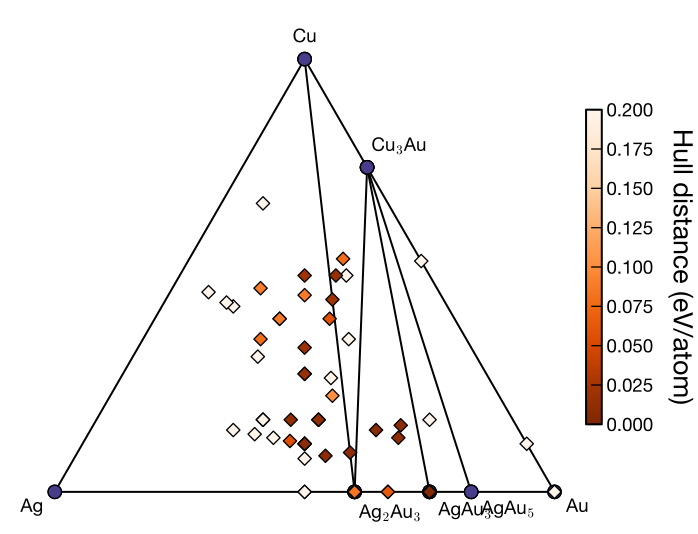
With the default settings, the convex hull plot at the end of generation 3 is saved as ./data/convex_hull/conv_hull_gen_3.svg. Automatic output of the convex hull plot follows the same energy_output_interval setting. Although svg is the default format, it can be changed to pdf or png by modifying the fig_format in the input file.
case_Cu-Ag-Au_EA-vc_gen3.svg case_Cu-Ag-Au_EA-vc_gen3.svg